
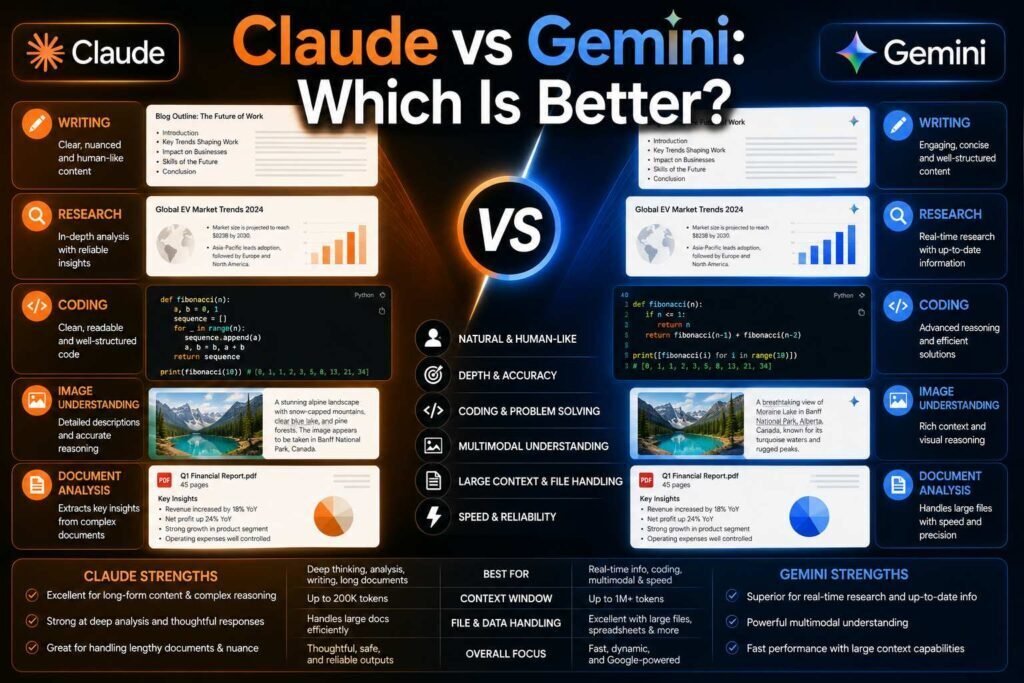
Claude and Gemini compete for the same seat: the AI assistant a professional keeps open all day. They get there from different directions. Anthropic built Claude around careful reasoning and writing quality; Google built Gemini around scale, multimodality, and its ecosystem. Here is where each actually wins, and how to decide between them for your own work.
Quick verdict: Claude is the stronger tool for writing quality, careful analysis, and professional coding work. Gemini wins on value (generous free access), raw context capacity, native multimodality (image, audio, video), and anything touching Google Workspace. Budget pick: Gemini. Deep-work pick: Claude.
Key Takeaways
- Claude’s edge is quality per response: prose, code architecture, and honest uncertainty.
- Gemini’s edge is breadth: free tier generosity, huge context windows, video/audio input, and Workspace integration.
- Both offer paid tiers around $20/month; Gemini gives away more before you pay.
- For long-document specifics, see our dedicated Claude vs Gemini for long documents comparison.
How to Decide
The fastest way to choose is to weigh two things: whether the quality of each individual answer is what you are paying for, and whether your work already lives inside Google’s tools. If your output is writing, analysis, or code where a better response saves real editing or debugging time, lean toward Claude. If you spend your day in Gmail, Docs, and Drive, or you want the most capable free option, lean toward Gemini. Then confirm it with a few days of your real work in each free tier. The sections below tell you what to look for in that test.
Side by Side
| Dimension | Claude | Gemini |
|---|---|---|
| Writing quality | Excellent; natural, voice-faithful prose | Good; utilitarian by default |
| Research | Careful with sources; web search available | Strong; Google Search grounding, Deep Research modes |
| Coding | Excellent; Claude Code for agentic work | Strong; free Gemini CLI, good completions |
| Multimodal input | Text, images, documents | Text, images, audio, video |
| Context window | Very large | Typically largest advertised |
| Ecosystem | Projects, Artifacts, MCP, API | Gmail, Docs, Drive, Android, NotebookLM |
| Free tier | Limited daily use | Generous |
| Paid entry (verify) | About $20/month | About $20/month (Google One AI tiers) |
Snapshot as of early 2026; verify current models and pricing on both official sites.
Writing
Claude is the writers’ choice in this matchup and it is not particularly close for long-form work: better voice matching, fewer AI-flavored constructions, and more useful critical feedback on drafts. Gemini writes competent, structured content quickly and shines for Workspace-native tasks such as drafting in Docs or summarizing Gmail threads, but its default register runs generic and needs heavier editing to sound like you. If your writing carries your name and reputation, that editing time adds up, which is why professionals who write for a living tend to keep Claude in the loop for anything that ships.
Research
Gemini’s grounding in Google Search and its Deep Research capabilities make it the faster engine for open-web questions, and NotebookLM, Google’s source-grounded companion tool, is outstanding for working from your own materials. Claude counters with source fidelity: when analyzing documents you provide, it is more careful about what the text actually says and more willing to flag uncertainty. The rule of thumb is simple: reach for Gemini for broad discovery across the web, and for Claude for careful reading of a specific document, and open the sources for anything important regardless of which you use.
Coding
Both are top-tier and each release reshuffles benchmark positions. The practical difference: Claude Code has become a favorite for agentic development such as multi-file changes, running tests, and iterating, while Gemini offers a capable free CLI and generous free API usage that budget-constrained developers appreciate. Professional teams more often standardize on Claude for complex work; hobbyists and students get further on Gemini for free. Whichever you choose, review and test generated code before shipping. The full landscape is in our AI coding tools roundup.
Multimodality and Everyday Use
This is a clear Gemini strength. It accepts audio and video inputs natively, not just text and images, so you can hand it a recording, a screenshot, or a video and ask it to work with the content directly. Claude handles text, images, and documents well but does not match that range of input types. For everyday, on-the-go, multimodal tasks, Gemini is the more flexible companion; for focused text and document work, Claude’s narrower feature set is rarely a limitation and its interface stays out of the way.
Ecosystem
If your organization runs Google Workspace, Gemini’s integration is a structural advantage no rival matches: it lives inside Gmail, Docs, and Drive, acting on your real files. Gemini may also already be bundled into your Workspace plan. Claude’s ecosystem strengths are different: Projects for persistent working context, Artifacts for interactive outputs, and the MCP standard for connecting tools, which has become an industry default. The question is where your work already happens: inside Google’s suite, Gemini has a home-field advantage; in a mixed or developer-centric stack, Claude’s power features shine.
Privacy and Data
As with any AI assistant, understand the data settings for your specific plan. Consumer tiers may use your conversations to improve models unless you opt out, while business and enterprise tiers typically keep training off by default and offer stronger controls. For sensitive or regulated material, use an approved, appropriately configured tier rather than a personal free account on either platform, and review each vendor’s current data controls before putting confidential information in.
Pricing
Both land near $20/month for individual paid tiers with premium tiers above (verify current pricing). The asymmetry is the free tier: Gemini’s is generous enough to be a daily driver, while Claude’s free tier is more of an evaluation tool. For teams, compare current per-seat business pricing on both sites, and note Gemini may already be included in your Workspace subscription, which can tip the value calculation before you pay for anything extra.
Getting the Best From Either Tool
Whichever you choose, how you prompt matters more than the logo on the tab. Both improve dramatically when you give a clear role, real context, the format you want, and an example of good output. For writing, paste a sample of your voice and ask the tool to match it, which closes much of the quality gap. For research, ask for sources and open them. For documents, put the source first and your question last. For code, supply the language, versions, the actual error, and the surrounding files. Master those habits and the durable difference between Claude and Gemini becomes what it really is, a matter of style, ecosystem, and value rather than raw capability. Our Claude and Gemini prompt libraries are built around this.
Team and Business Use
For organizations, the decision often turns on fit with your existing stack rather than on individual response quality. A team already standardized on Google Workspace gets immediate value from Gemini because it works inside the tools everyone uses, and it may already be bundled into the subscription. A team that builds its own products, works across a mixed toolset, or prioritizes writing and analysis quality may prefer Claude, with its Projects, connectors, and strong API. Whichever you lean toward, pilot it with a handful of real users on real work before standardizing, and confirm current per-seat business pricing and data controls on the official pages, since both change regularly.
Which Should You Choose?
- Writers, editors, marketers: Claude.
- Researchers: Gemini for discovery, Claude for document analysis; many keep both.
- Developers: Claude for professional agentic work; Gemini for free capability.
- Google Workspace teams: Gemini, decisively.
- Students and budget users: Gemini free tier, with Claude free for final drafts.
- Anyone working with audio or video input: Gemini.
Two Real-World Scenarios
Consider a freelance writer juggling client articles and their own newsletter. Response quality is their product, so Claude’s voice-faithful prose and honest critique save real editing time on every piece; they might use Gemini’s free tier for quick research. Now consider a team standardized on Google Workspace that wants AI in the tools they already use, plus the occasional audio or video summary. Gemini is the obvious default: it lives in Gmail, Docs, and Drive, handles multimodal input, and may already be paid for. Same two assistants, opposite right answer, decided by the nature of the work and where it happens.
Common Mistakes to Avoid
- Choosing on the free tier alone. Gemini’s generosity is real, but if response quality is your product, factor that in, not just cost.
- Ignoring your existing stack. If your team lives in Google Workspace, that integration often outweighs small quality differences.
- Expecting one to win every task. Claude for depth, Gemini for breadth and ecosystem; many professionals keep both.
- Trusting facts without checking. Both still hallucinate; Gemini’s grounding and Claude’s caution help, but verification is on you.
- Putting sensitive data in a free personal account. Use an approved tier with training off for confidential work.
FAQs
Is Gemini really free?
The free tier is unusually generous, including long-context access and the CLI for developers. Paid tiers add the best models, higher limits, and Workspace features (verify current tier contents).
Which hallucinates less?
Both hallucinate less than earlier generations and both still do it. Claude is more likely to express uncertainty; Gemini’s search grounding helps on factual queries. Verify anything that matters regardless of tool.
Claude vs Gemini vs ChatGPT: what if I can pick only one?
Pick by dominant task: writing and documents, Claude; Google ecosystem or budget, Gemini; maximum versatility, ChatGPT. Our ChatGPT vs Claude comparison covers the third corner of the triangle.
Which is better for long documents specifically?
Both handle large context, but they behave differently on dense material. We break this down in detail in Claude vs Gemini for long documents; in short, capacity is not the same as careful comprehension.
Can I use both without paying?
Yes. Gemini’s free tier can serve as a daily driver, and Claude’s free tier is enough to reach for on writing and analysis where its quality helps. Many people run exactly this free combination before deciding whether either paid plan is worth it.
Which is better for a student?
Gemini’s generous free tier makes it a strong default for students, covering research, study help, and writing without a subscription. Keep Claude’s free tier handy for final drafts of essays where prose quality counts. Our student tools guide covers the wider set.
Do I need to pick just one?
No, and many professionals do not. A common setup is Gemini for its free capacity, ecosystem, and multimodal input, plus Claude for high-quality writing and careful analysis. If your work spans both needs, running the two together often beats forcing a single tool to do everything.
Which is better for coding?
Both are strong. Claude Code is a favorite for agentic, multi-file development, while Gemini offers a capable free CLI and generous free usage that budget-minded developers value. Professional teams often standardize on Claude for complex work; hobbyists and students go far on Gemini for free. Our coding tools roundup compares the field.
Will my choice be outdated soon?
Specific model rankings shift every few months, which is why this guide focuses on durable differences, Claude’s response quality and Gemini’s access, capacity, and ecosystem, rather than version numbers. Re-run a quick test of your real work after major updates, but the underlying strengths tend to hold.
Is my data safe on either?
Both offer stronger data protections on business and enterprise tiers than on consumer plans, where conversations may be used to improve models unless you opt out. For sensitive work, use an approved, appropriately configured tier and review each vendor’s current data controls before putting confidential information in.
Our Verdict
Claude wins on the quality of individual responses; Gemini wins on access, capacity, and ecosystem. Professionals whose output quality pays their bills should default to Claude; everyone inside Google Workspace or on a budget should start with Gemini and upgrade their toolkit only when they hit its edges.
Related Articles
- ChatGPT vs Claude
- Claude vs Gemini for Long Documents
- Claude Prompt Library and Gemini Prompt Library
Sources: official Anthropic and Google product and pricing pages, checked early 2026.