
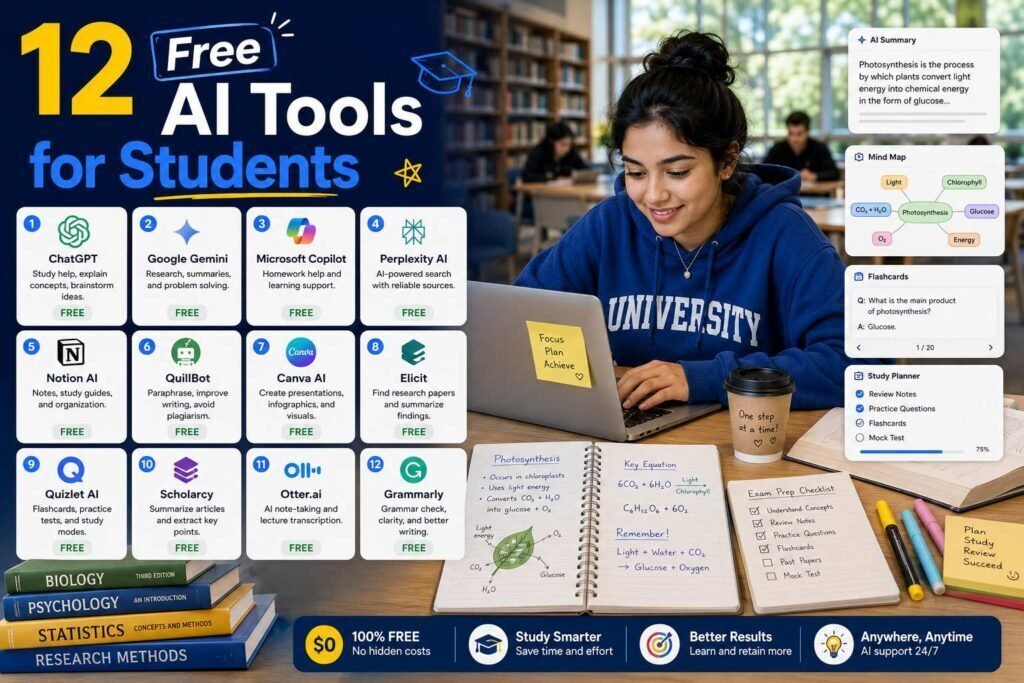
Students have the best free AI access of anyone: generous free tiers, education discounts, and tools built specifically for studying. Used well, they compress hours of busywork into minutes. Used badly, they produce submissions your professor has read a hundred times and detectors flag anyway. This guide covers both the tools and the line.
Quick answer: The core free stack is Gemini or ChatGPT (free tiers) for explanation and practice, NotebookLM for turning your readings into study material, Zotero for citations, and Canva Free for presentations. Check your school email for education offers before paying for anything.
Key Takeaways
- NotebookLM is the best free study tool most students have not tried: it works only from your uploaded sources, which keeps it grounded.
- Free tiers of the big assistants are enough for studying; students rarely need paid plans.
- Use AI to understand and practice, not to submit. Your institution’s academic integrity policy is the rulebook; read it.
- Always verify citations: AI assistants fabricate plausible-looking references.
How AI Helps You Learn, and How It Doesn’t
There is a simple test for whether you are using these tools well: did you end up understanding something you could now do without the tool? Used that way, AI is the best tutor you have ever had, explaining a concept three different ways, quizzing you until you find your gaps, and pressure-testing your argument before a professor does. Used the other way, to produce a submission you did not write and cannot defend, it robs you of the exact skill the course exists to build, and it tends to produce the generic prose graders recognize on sight. Everything below is organized around the first use: understanding, practicing, organizing, and verifying. Keep the writing itself yours, and let AI make you faster at learning rather than a shortcut around it.
The Free Stack at a Glance
| Tool | Job | Free tier limits (verify) |
|---|---|---|
| Gemini | Explanations, practice, long readings | Generous; student offers often available |
| ChatGPT | Explanations, brainstorming | Daily limits on best models |
| Claude | Careful reading and writing feedback | Daily message limits |
| NotebookLM | Source-grounded study guides, audio overviews | Free with Google account |
| Zotero | Citation management | Fully free (storage limits) |
| Grammarly | Grammar and clarity | Free tier covers basics |
| Canva | Presentations and posters | Free tier; education offers |
| Quizlet / Anki | Flashcards and spaced repetition | Anki free (desktop); Quizlet freemium |
| Perplexity | Research with citations | Free tier; student offers appear periodically |
| Otter | Lecture transcription (where permitted) | Monthly minute limits |
| Wolfram Alpha | Math step-checking | Free basic; paid steps |
| Google Scholar + AI | Finding real papers | Free |
Understanding: Gemini, ChatGPT, and Claude
The best study use of a general assistant is not writing; it is tutoring. Ask it to explain a concept three ways, quiz you until you miss, or take the other side of an argument you are drafting. Gemini’s free tier is currently the most generous, and Google has periodically offered students free premium access (check with your .edu email). Claude’s free tier shines for feedback on your own drafts: paste your essay and ask what a tough grader would challenge.
Studying From Your Own Sources: NotebookLM
Upload lecture slides, readings, and your notes; NotebookLM answers questions using only those sources, with citations back to them, and generates study guides, timelines, and podcast-style audio overviews. Because it cannot wander beyond your materials, it hallucinates far less than open-ended chatbots, which is exactly what you want two days before an exam. Free with a Google account.
Research: Perplexity, Google Scholar, and Verification
Perplexity answers with linked citations, making it a better research starting point than a bare chatbot. Chase every citation to the actual source before it goes anywhere near your bibliography: AI tools fabricate convincing fake references, and submitting one is a miserable way to fail an assignment. Google Scholar remains the source of truth for what actually exists.
Writing Support: Grammarly and the Integrity Line
Safe and universally accepted: grammar checking, clarity suggestions, and feedback on your own drafts. Risky to prohibited: submitting AI-generated text as your work. Policies vary by institution and even by course, so read yours, and when a professor allows AI assistance, disclose it as instructed. A practical test: if the tool taught you something you can now do without it, you used it well.
Mechanics: Zotero, Anki, Canva, Otter, Wolfram Alpha
Zotero (free, open source) collects sources with one click and formats bibliographies in any style; it will save you entire evenings. Anki’s spaced repetition is the most evidence-backed study technique in this article; feed it cards you generate with an assistant, then edit them, because editing is studying. Canva Free covers presentations. Otter transcribes lectures where recording is permitted (ask first). Wolfram Alpha checks math work step by step.
Turning an Assistant Into a Personal Tutor
The highest-value study use of a general assistant is not asking it for answers but making it teach you. A few prompts change everything. Ask it to explain a concept at three levels, from a one-sentence version to a technical one, so you can find the depth you need. Ask it to quiz you one question at a time and keep going until you miss, then explain what you got wrong. Ask it to take the opposing side of an argument you are drafting, so you strengthen your own. And ask it to turn a chapter into ten practice questions with worked solutions. Each of these builds understanding you keep, which is the whole point, and none of them involves submitting anything the assistant wrote.
Exam-Season Efficiency
When time is short, the free stack pays off most if you use it to compress busywork, not to skip learning. Turn a semester of readings into a grounded study guide with NotebookLM, then spend your energy on the concepts it surfaces rather than on hunting through PDFs. Convert those concepts into Anki cards and let spaced repetition schedule your revision so you study the right things at the right time. Use an assistant for rapid self-testing between sessions, and Wolfram Alpha or a coding assistant to check the mechanical steps you keep getting wrong. The goal in exam season is to spend your limited hours on understanding and recall, and to let the tools absorb the sorting, formatting, and scheduling around them.
A Study Workflow That Actually Works
The tools matter less than how you chain them. A workflow that holds up under exam pressure looks like this. Capture your materials in one place, uploading slides, readings, and notes into NotebookLM so everything is searchable and grounded. Understand by asking a general assistant to explain the hard concepts several ways and to quiz you until you miss. Practice with spaced repetition in Anki, generating draft flashcards with an assistant and then editing them, because the editing is itself studying. Verify anything factual against real sources through Perplexity and Google Scholar. And keep your citations organized in Zotero from the first source, not the night before submission. Each step uses a free tool, and together they turn scattered materials into a repeatable routine.
By Subject: Which Tools for What
Different subjects lean on different tools. In STEM, Wolfram Alpha checks math step by step, a general assistant explains derivations and debugs code, and NotebookLM condenses dense problem sets and lecture notes. In the humanities and social sciences, Claude’s careful reading shines for feedback on essays and for interrogating arguments, Perplexity and Google Scholar drive research, and Zotero manages the heavier citation load. For languages, assistants are strong conversation and grammar partners, while a transcription tool helps with listening practice. For any group project or presentation, Canva turns your content into something polished. Match the tool to the subject rather than forcing one assistant to cover everything.
Getting Student Discounts and Offers
Before paying for anything, check what you already get for free as a student. Many AI tools and productivity apps run periodic education programs, and Google in particular has at times offered students free access to premium tiers, so it is worth checking with your school email. Your institution may also provide licenses to software you would otherwise buy, from writing tools to full productivity suites. The pattern is simple: exhaust free tiers and verified student offers first, and treat a paid subscription as a last resort for a limit that genuinely blocks you every day. Confirm current offers on each tool’s official education page, since these programs change.
Common Mistakes to Avoid
- Submitting AI-written work. It skips the learning, risks integrity violations, and reads as generic to graders. Write your own submissions.
- Trusting fabricated citations. AI invents convincing fake references; verify every one against the real source before it reaches your bibliography.
- Paying too early. Free tiers and student offers cover almost everything; subscribe only when a limit blocks you daily.
- Recording lectures without permission. Transcription is useful, but ask first; policies and laws vary.
- Ignoring your course’s AI policy. Rules differ by institution and even by class; read yours and disclose assistance when required.
FAQs
Will professors know I used AI?
Often, yes: generic AI prose is recognizable, and detectors (imperfect as they are) get used. More importantly, AI-written submissions do not build the skills the course exists to teach. Use AI to learn; write your own submissions.
What is the best completely free AI tool for studying?
NotebookLM, because grounding in your own course materials makes it both safer and more relevant than open-ended chatbots.
Should students pay for any AI tool?
Usually no. Exhaust free tiers and education offers first. If one limit genuinely blocks you daily, a single $20/month assistant is the only defensible purchase.
Do these free tiers really cover everything a student needs?
For the vast majority of coursework, yes. Between generous free assistants, NotebookLM, Zotero, Anki, and Canva, you can explain, research, memorize, cite, and present without spending anything. Paid plans mainly remove usage limits, so most students never need one, especially after checking for education offers on their school email.
Is it cheating to use AI for studying?
Using AI to understand material, quiz yourself, organize sources, or get feedback on your own draft is generally fine and often encouraged, while submitting AI-written work as your own is not. The line is set by your institution’s academic integrity policy and sometimes by individual courses, so read yours and, when a professor permits AI help, disclose it as instructed.
How do I avoid AI-detector false flags?
The reliable way is to actually write your own work; detectors are imperfect and sometimes flag genuine writing, but original work you can explain and defend is the real protection. Use AI to understand and to get feedback, then write in your own voice. If you are worried, keeping drafts and notes shows your process.
Which free tools should a student install first?
Start with NotebookLM for studying from your own materials, a general assistant like Gemini or ChatGPT for explanations and practice, Zotero for citations, and Anki for spaced-repetition memorization. That free core covers understanding, research, and revision; add Canva, a transcription tool, or Wolfram Alpha as specific needs arise.
Can AI help me if I learn differently or need extra support?
Yes, and this is one of its most valuable uses. An assistant will re-explain a concept as many times and as many ways as you need without impatience, adjust to your pace, and turn material into the format that works for you, whether that is a summary, a set of questions, or a step-by-step walkthrough. Used to understand rather than to submit, it is a patient tutor available whenever you study.
Our Verdict
The free stack of Gemini or ChatGPT, NotebookLM, Zotero, Anki, and Canva covers explanation, studying, citations, memorization, and presentation without spending anything. Add the discipline of verifying citations and writing your own submissions, and AI becomes what it should be for students: the best tutor you have ever had, available at 2 a.m. before the exam.
Related Articles
- Best Free AI Logo Generators
- Claude vs Gemini for Long Documents
- Best Chrome Extensions for Productivity
Sources: official product pages and education program pages, checked early 2026. Free-tier limits change frequently; verify current limits.