
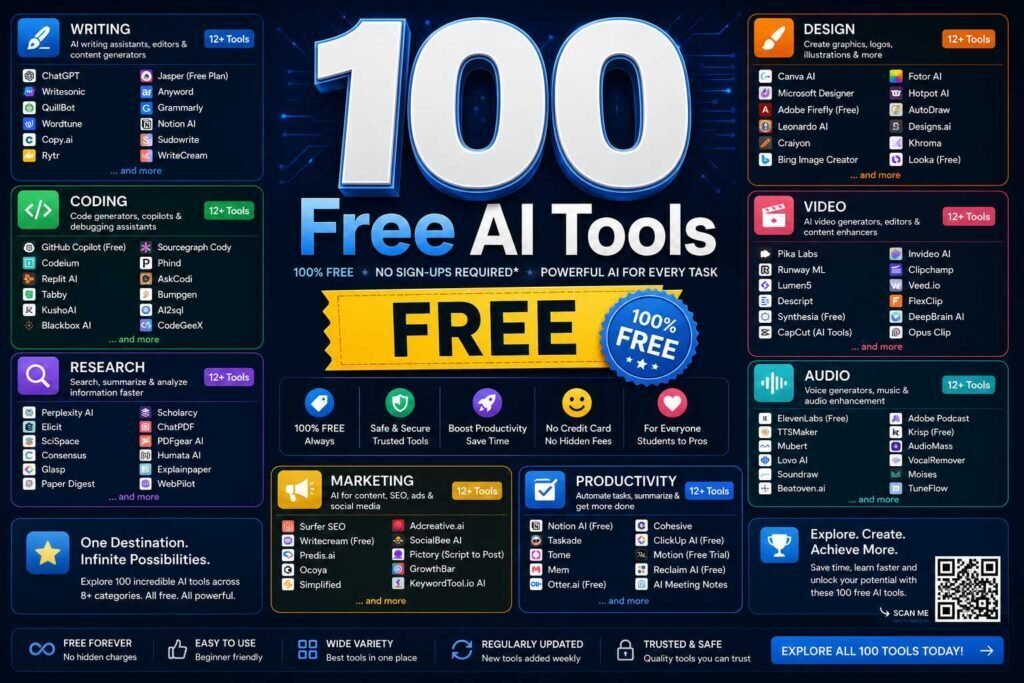
Every “free AI tools” list promises 100 tools; most pad the count with trials and dead links. This directory lists tools that offer a genuinely usable free tier, grouped by job, with a one-line honest note on the catch. Our top pick in each category gets a short explanation. Free tiers change constantly: we recheck this page on a schedule, and the date below tells you when.
Last verified: [UPDATE THIS DATE AT EACH REVIEW].
Key Takeaways
- The most capable free AI stack today: Gemini (assistant), NotebookLM (study/research), Canva (design), Bing/Designer image tools, and Zapier or Make free tiers (automation).
- “Free” usually means send limits, watermarks, or seats; we note the catch per tool.
- Ten great tools you use beat 100 you bookmarked. Pick one per job.
What “Free” Actually Means Here
Not all free tiers are equal, and this directory is honest about the catch in each row. “Free” usually comes in a few flavors: a generous ongoing tier that is genuinely usable for real work, a monthly credit or token grant that runs out, a limited version designed to nudge you toward a paid upgrade, or an open-source tool that costs nothing to run but requires your own setup or hardware. The “catch” column tells you which kind you are looking at. Read it before you commit a workflow to a tool, because the fastest way to get burned is to build a habit on a free tier that later paywalls the one feature you actually needed.
AI Assistants and Chat (10)
Top pick: Gemini, for the most generous free tier of any frontier assistant.
| Tool | What it does free | The catch |
|---|---|---|
| Gemini | Frontier chat, long context, image input | Best models metered |
| ChatGPT | Capable free chat, image gen (limited) | Daily caps on top models |
| Claude | High-quality chat and analysis | Tight daily message limits |
| Microsoft Copilot | GPT-class chat inside Windows/Edge | Consumer data terms |
| Perplexity | Cited answers, research | Pro searches limited |
| Mistral Le Chat | Fast capable free chat | Smaller ecosystem |
| DeepSeek | Strong free reasoning/coding chat | Data residency concerns for business use |
| Grok | Chat with X integration | Limits without X Premium |
| Meta AI | Free chat across Meta apps | Consumer-only feel, ads ecosystem |
| Pi | Conversational, empathetic chat | Not built for work tasks |
Writing and Editing (10)
Top pick: the free tier of any frontier assistant, plus these specialists:
| Tool | What it does free | The catch |
|---|---|---|
| Grammarly Free | Grammar, spelling, tone basics | Rewrites gated to paid |
| LanguageTool | Open-source grammar checking | Advanced style paid |
| Hemingway Editor (web) | Readability scoring | Desktop app paid |
| QuillBot Free | Paraphrasing, summarizing | Word limits |
| Wordtune Free | Sentence rewrites | Daily rewrite cap |
| Notion AI (trial credits) | Drafting inside docs | Credits then paid |
| Google Docs + Gemini basics | Drafting help in Docs | Best features need paid tier |
| Rytr Free | Short-form generation | Monthly character cap |
| Simplified Free | Marketing copy basics | Seats and word caps |
| Cleve/Headline analyzers | Free headline scoring tools | Point tools only |
Deeper picks in our AI writing tools guide.
Image Generation and Design (10)
Top pick: Canva Free, because generation plus editing plus templates in one place beats a raw generator for most real tasks.
| Tool | What it does free | The catch |
|---|---|---|
| Canva Free | Design suite + AI images | Premium assets locked |
| Microsoft Designer / Image Creator | DALL-E-class images free | Boost credits meter speed |
| Adobe Firefly (free credits) | Commercial-safe generation | Monthly credit cap |
| Ideogram Free | Great text-in-image rendering | Daily generation cap |
| Leonardo Free | Daily token grant, strong models | Public generations on free |
| Stable Diffusion (local) | Unlimited local generation | Needs a GPU and setup |
| Playground | Free daily images, editing | Caps and queues |
| Krea Free | Real-time generation tools | Limited credits |
| Remove.bg | Background removal | Full-res paid |
| Upscayl | Open-source image upscaling | Local install |
Full comparison in our AI image generators roundup.
Coding (10)
Top pick: Gemini CLI / Codeium free tiers for individual developers.
| Tool | What it does free | The catch |
|---|---|---|
| GitHub Copilot Free | Limited completions and chat | Monthly caps |
| Codeium | Unlimited individual completions | Team features paid |
| Gemini CLI | Agentic terminal coding free | Rate limits |
| Claude free tier | High-quality code review/explain | Daily limits |
| Cursor Free | AI editor with starter quota | Pro models metered |
| Ollama | Run open models locally | Hardware dependent |
| Replit Free | Browser IDE with AI basics | Compute limits |
| Phind | Developer-focused search | Query caps |
| Sourcegraph Cody Free | Codebase chat, completions | Usage caps |
| v0 / bolt free tiers | UI generation from prompts | Credit metered |
See the full AI coding tools guide.
Research and Study (10)
Top pick: NotebookLM, the best genuinely free AI study tool available.
| Tool | What it does free | The catch |
|---|---|---|
| NotebookLM | Source-grounded notebooks, audio overviews | Notebook/source caps |
| Perplexity | Cited research answers | Pro model limits |
| Semantic Scholar | AI-enhanced paper search | Academic corpus only |
| Connected Papers | Visual paper graphs | Monthly graph cap |
| Elicit Free | Paper Q&A and extraction | Credit limits |
| Zotero | Citation management | Storage caps (cheap upgrade) |
| Google Scholar | Scholarly search | No AI features, but truth source |
| Anki | Spaced repetition | iOS app paid |
| Wolfram Alpha | Computation and math | Steps paid |
| Otter Free | Meeting/lecture transcription | Monthly minutes cap |
Students: see the dedicated free AI tools for students guide.
Productivity and Meetings (10)
Top pick: Zapier Free to connect the rest, with Fireflies or Tactiq for meeting notes.
| Tool | What it does free | The catch |
|---|---|---|
| Fireflies Free | Meeting transcription | Limited credits/storage |
| Reclaim Free | AI calendar scheduling | Feature caps |
| Todoist + AI filters | Task management | AI assist features paid |
| Notion Free | Docs/projects workspace | AI is a paid add-on |
| ClickUp Free | Project management | AI add-on paid |
| Loom Free | Screen recording | Video count/length caps |
| Tactiq | Live meeting transcripts (extension) | Monthly caps |
| Goblin Tools | Task breakdown for focus | Simple by design |
| Cron/Notion Calendar | Smart calendar | Light AI |
| Zapier Free | Automation, AI steps | Task caps, slow polling |
Team-grade picks in AI productivity apps for remote teams.
Audio, Video, and Voice (10)
Top pick: CapCut or Descript for editing, with Whisper (open source) for the best free transcription.
| Tool | What it does free | The catch |
|---|---|---|
| CapCut | AI video editing | Watermarks/features vary; review terms |
| Descript Free | Text-based audio/video editing | Hour and watermark caps |
| ElevenLabs Free | Realistic TTS | Small monthly character cap |
| Suno Free | Music generation | Daily credits, non-commercial |
| Adobe Podcast Enhance | One-click audio cleanup | Length caps |
| Clipchamp | Video editor with AI | Best exports paid |
| Runway Free | Video AI starter credits | Credits burn fast |
| Whisper (open source) | Best-in-class transcription locally | Technical setup |
| Vocal Remover.org | Stem separation | Point tool |
| YouTube auto-dub/captions | Free captioning | Accuracy varies |
Marketing, SEO, and Business (10)
Top pick: HubSpot Free CRM, plus Google Search Console and Trends as free truth sources.
| Tool | What it does free | The catch |
|---|---|---|
| HubSpot Free CRM | Real CRM with AI basics | Automation paid |
| Mailchimp Free | Small-list email | Tight contact caps |
| Brevo Free | Email with automation | Daily send cap |
| Google Search Console | SEO truth source | Your site only |
| Google Trends | Demand research | Relative data |
| AnswerThePublic Free | Question research | Daily search cap |
| Ubersuggest Free | Keyword basics | Daily cap |
| Buffer Free | Social scheduling | Channel caps |
| Meta/Google ad AI tools | Native ad optimization | You pay for the ads |
| Canva Content Planner | Design + scheduling | Pro features paid |
Automation and Agents (10)
| Tool | What it does free | The catch |
|---|---|---|
| Zapier Free | Cross-app automation | Task caps |
| Make Free | Visual automation, generous ops | Learning curve |
| n8n (self-hosted) | Unlimited automation | You run the server |
| IFTTT Free | Simple triggers | Applet caps |
| Gemini CLI agents | Free agentic scripting | Rate limits |
| Browser-use open tools | Web automation agents | Technical |
| Hugging Face Spaces | Thousands of free AI demos | Queues, variable quality |
| Google Apps Script + AI APIs | Free Workspace automation | Coding required |
| Pipedream Free | Developer automation | Invocation caps |
| Windows Power Automate | Desktop automation included | Windows-centric |
How to choose between them: automation tools for small businesses.
Everyday Utilities (10)
Top pick: DeepL Free for translation, with Photopea as a free Photoshop-class editor.
| Tool | What it does free | The catch |
|---|---|---|
| DeepL Free | Best-in-class translation | Length caps |
| Google Translate | Universal translation | Less nuanced |
| PDFgear / Smallpdf AI free | PDF chat and tools | Daily limits |
| Scribe Free | Auto step-by-step guides | Branding on free |
| Bitwarden | Password manager | None that matter |
| TinyWow | Grab-bag of free AI utilities | Ads |
| Photopea | Free Photoshop-class editor + AI | Ads |
| Lens/Circle to Search | Visual search | Mobile-centric |
| Windows/macOS dictation | Built-in speech-to-text | Quality varies |
| Browser built-in AI (Chrome/Edge) | Summaries, writing help | Evolving fast |
How to Build a Free Stack for Your Work
You do not need all 100 tools; you need one good one per job you actually do. A capable, entirely free setup for most people looks like this: a frontier assistant such as Gemini for everyday chat and drafting, NotebookLM for studying and research from your own sources, Canva for design and images, a coding assistant like Codeium or the Gemini CLI if you write code, an automation tool such as Zapier or Make for connecting apps, and DeepL for translation. Add specialists only where a real, recurring need justifies them: a transcription tool if you sit in many meetings, an image generator if you produce visuals weekly, and so on. Ten tools you use well beat a hundred bookmarks you never open.
Common Mistakes to Avoid
- Collecting tools instead of using them. A long bookmark folder is not a workflow; pick one tool per job and learn it.
- Ignoring the catch. Free tiers have limits, caps, watermarks, or seats. Read the catch column before building a habit on a tool.
- Putting business data in free consumer tiers. Assume inputs may be used for training unless settings say otherwise; use business tiers for sensitive work.
- Assuming free is forever. Free tiers change and disappear. Keep a backup option in mind for any tool you rely on.
- Overlooking open-source and built-in tools. Some of the best free options, from Whisper to your operating system’s dictation, cost nothing and are easy to miss.
FAQs
What is the best completely free AI tool overall?
For most people, Gemini’s free tier: frontier-quality answers, long context, and no cost. NotebookLM is the best free tool most people have never opened.
Are free AI tools safe for business data?
Assume free consumer tiers may use inputs for training unless settings say otherwise. Keep client data out of free tools; use business tiers with training disabled for sensitive work.
How do you keep this list accurate?
We recheck listed free tiers on a recurring schedule and remove tools that die or paywall. The verification date at the top reflects the last full pass. Spot something outdated? Report it and we will fix it.
How many of these do I actually need?
Far fewer than 100. Most people run well on five or six: an assistant, a research tool, a design tool, and one each for whatever else they do often. Use the categories to pick one tool per job rather than trying everything.
Are the open-source tools hard to set up?
Some, like Stable Diffusion, Whisper, or n8n, need a bit of technical comfort or your own hardware, which is the trade-off for being unlimited and private. If that is not for you, the hosted free tiers in each category cover the same jobs with zero setup.
Will a free tool be enough, or will I have to pay eventually?
For many people, free tiers cover the whole need indefinitely. You should only pay when a specific free limit, such as send caps, watermarks, or metered credits, is costing you real time every week. Let the limit, not the marketing, decide when to upgrade.
Which categories should a small business start with?
Usually an assistant, a design tool, an email or CRM tool, and one automation platform, all of which have genuinely usable free tiers here. Start with those four, learn them, and expand into research, audio, or video tools only as specific needs come up.
Our Verdict
You can assemble a startlingly capable work setup for $0: Gemini, NotebookLM, Canva, Codeium, Zapier, and DeepL cover assistant, research, design, coding, automation, and translation. Add paid tools only where a free tier’s limit costs you real time weekly.
Related Articles
Sources: each tool’s official site and pricing page. Free tiers verified early 2026; re-verify on the schedule noted above.