
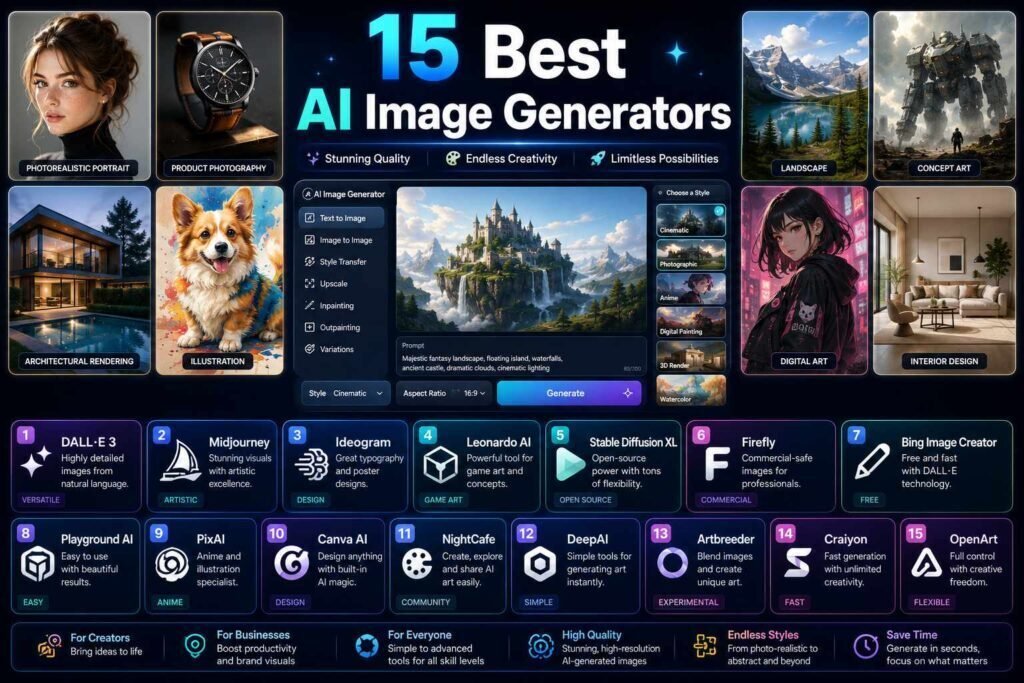
AI image generators have split into specialists: one is best for art, another for text rendering, another for commercial safety, another for photorealistic marketing shots. Picking “the best” means picking for your use case, and for business use the license terms matter as much as the pixels. This guide sorts the leading tools by the job you actually need done.
Quick answer: Midjourney still leads for artistic quality. Ideogram wins when images contain text. Adobe Firefly is the safe choice for commercial work thanks to its licensed training data and indemnification on enterprise plans. Canva is the practical pick when generation is one step in making a finished asset. Free: Microsoft Designer or Flux via free hosts.
Key Takeaways
- Match the generator to the job: art (Midjourney), text-in-image (Ideogram), commercial safety (Firefly), assets-in-context (Canva), control (Stable Diffusion/Flux locally).
- For client work, read the license: training-data provenance and indemnification differ enormously.
- Label AI-generated images honestly, especially anything resembling real people or products.
- Prompting skill moves quality more than switching tools; see our Midjourney prompt library.
How We Picked
Image quality is the obvious criterion, but it is not the only one that matters, especially for business use. We weighed four things: the visual quality and style range each tool produces, how well it handles the specific job it is known for, the commercial-license terms that determine whether you can safely use the output, and the price and free access. For anything client-facing, we treat licensing as a first-class factor rather than an afterthought, because a stunning image you are not licensed to use is worthless. Use the table to shortlist by job and budget, then read the section that matches your use case.
The 15 at a Glance
| Tool | Best for | Price (verify) | Free option |
|---|---|---|---|
| Midjourney | Artistic quality, style range | From about $10/month | No |
| Ideogram | Text rendering, posters, logos | Free tier; paid from about $8/month | Yes |
| Adobe Firefly | Commercially safe generation | Credits in CC plans; standalone tiers | Monthly credits |
| DALL-E (in ChatGPT) | Convenience inside chat | With ChatGPT plans | Limited free |
| Flux | Open-weights quality leader | Free via hosts; API pricing | Yes |
| Stable Diffusion (local) | Full control, unlimited | Free (GPU needed) | Yes |
| Leonardo | Game/concept art pipelines | Free daily tokens; paid tiers | Yes |
| Canva | Generation inside design workflow | Free tier; Pro about $15/month | Yes |
| Microsoft Designer | Best free casual generation | Free with account | Yes |
| Google Imagen (Gemini/Whisk) | Fast, integrated with Google | Free tier; paid tiers | Yes |
| Krea | Real-time and upscaling | Free tier; paid plans | Yes |
| Playground | Editing + generation mix | Free tier; paid plans | Yes |
| Recraft | Vector and brand-style output | Free tier; paid plans | Yes |
| Freepik AI | Stock-integrated workflows | In Freepik plans | Limited |
| Getty/Shutterstock AI | Enterprise indemnified stock-style | Enterprise pricing | No |
Pricing checked early 2026; verify current plans and license terms per tool before commercial use.
Best for Artistic Quality: Midjourney
Midjourney (from about $10/month, no free tier) remains the quality benchmark for artistic and editorial imagery, with the strongest style control and an unmatched community of shared prompts to learn from. It excels at mood, composition, and painterly or cinematic looks that other tools approximate at best. Its weaknesses are a lack of any free tier and a license worth reading carefully for commercial contexts. If your work is art direction, editorial illustration, or anything where a distinctive look matters more than legible text, this is where most professionals start. Pair it with our Midjourney prompt library to get the most from it.
Best for Text in Images: Ideogram
Ideogram solved the problem that plagued everyone else for years: legible, correctly spelled text inside images. For social graphics, posters, thumbnails, and mock logos, where a headline or word has to render cleanly, it is the specialist, and it offers a free tier to try. If your images regularly need words in them, this alone can justify reaching for Ideogram over a higher-art-quality tool that mangles typography. As always, add the final headline in a design tool when precision matters, but Ideogram gets you far closer than most.
Best for Commercial Safety: Firefly and Licensed Stock AI
Adobe Firefly trains on licensed content and offers indemnification for enterprises, making it the generator many legal departments approve first. Quality is strong if a little less adventurous than the art leaders, and its integration with Photoshop through Generative Fill is a genuine killer feature for editing real photos. For the most risk-averse commercial work, enterprise offerings from Getty and Shutterstock generate in a stock-style with licensing and indemnification built in. If you produce client or brand work at scale, the peace of mind from a clean licensing story often outweighs a small difference in raw image quality.
Best Free Options
You do not need to pay to generate good images. Microsoft Designer is the standout free pick for casual generation, producing usable results with no prompt expertise and landing them inside a design you can finish. Flux made open-weights generation competitive with the best closed models, and you can run it free through hosted services. Google’s Imagen, available through Gemini and Whisk, offers fast, integrated generation on a free tier, and Canva’s free plan includes generation alongside its templates. Start here before subscribing to anything; for many people, a free tool covers the whole need.
Best for Control: Stable Diffusion, Flux Local, and Leonardo
When you need total control, open models are the answer. Stable Diffusion remains the tinkerer’s platform, with LoRAs, ControlNet, and fine-grained control over composition and style, run locally on a decent GPU with no per-image cost. Flux can also be run locally for open-weights quality. Leonardo suits game and concept-art pipelines with reusable styles and tokens on a free tier. These reward technical comfort with unmatched flexibility and unlimited generation, at the cost of a steeper setup than a hosted tool. If you generate at volume or need repeatable, controllable output, the control is worth the learning curve.
Best for Finished Assets: Canva and Recraft
For most marketing tasks, the goal is not a raw image but a finished asset, and this is where generation-in-context wins. Canva and Microsoft Designer place generation inside a design workflow with templates, brand kits, and one-click resizing, so the generated image becomes a social post, ad, or presentation slide without a second tool. Recraft specializes in vector and brand-consistent output, useful when you need scalable graphics or a coherent set. When shipping the finished piece matters more than chasing the single best image, these tools save the most time.
Other Notable Tools
A few more are worth knowing. DALL-E, available inside ChatGPT, is the convenient choice when you are already in a chat and want a quick image without leaving the conversation. Krea focuses on real-time generation and high-quality upscaling. Playground blends editing and generation. Freepik AI ties generation into stock-integrated workflows for teams that already live in a stock library. None of these needs to be your main tool, but each shines for a specific habit or workflow, which is exactly the point: the “best” generator is the one that fits how you already work.
How to Get Better Results
Switching tools is the slow way to better images; prompting is the fast way. Describe the subject, then the style or medium, the lighting, the composition, and the camera or lens language, and generate in batches so you can pick and refine rather than expecting perfection on the first try. Use each tool’s controls, aspect ratio, style strength, and negative prompts, to steer the output. A skilled prompt on a free tool routinely beats a lazy prompt on a premium one, which is why prompt skill compounds while subscriptions just accumulate. Our Midjourney prompts collection doubles as a working curriculum for the vocabulary that matters.
Generating New Images vs Editing Real Ones
It is worth separating two jobs these tools do. Generating a brand-new image from a prompt is what most of this guide covers, and it is ideal for concepts, illustrations, and marketing visuals where nothing needs to match a real photo. Editing an existing image, extending a background, removing an object, or changing part of a photo, is a different task, and here Adobe Firefly’s Generative Fill inside Photoshop and the editing modes in Playground and Krea shine. If your real need is fixing or extending photos you already have rather than inventing new scenes, weight the editing tools heavily; if you are creating from scratch, the generation leaders above matter more. Many workflows use both: generate a base, then edit it to fit.
Commercial Use: Read Before You Ship
- Safest: Firefly, Getty/Shutterstock AI (licensed data, indemnification options).
- Generally fine with attribution care: Midjourney, Ideogram, DALL-E under their paid licenses (verify current terms).
- Your responsibility: anything generated locally.
- Always: avoid generating real people, trademarks, or styles marketed as a living artist’s; label AI-generated visuals per our editorial policy.
How to Choose
Rather than subscribing to several tools, match one to your dominant need and learn it deeply. Choose Midjourney if a distinctive artistic look is the point, Ideogram if your images need text, Firefly or licensed stock AI if commercial safety is paramount, Canva or Designer if you want finished assets fast, and Stable Diffusion or Flux locally if you need control and volume. If you are unsure or just starting, begin with a capable free option and only pay once you hit its limits. One tool used well beats a drawer of half-learned subscriptions.
Common Mistakes to Avoid
- Ignoring the license. For client work, provenance and indemnification matter as much as quality; a great image you cannot legally use is worthless.
- Blaming the tool for weak prompts. Most quality gaps close with better prompting, not a new subscription.
- Generating real people, logos, or a living artist’s style. These invite legal and ethical trouble; avoid them.
- Skipping disclosure. Label AI-generated visuals where your platform or jurisdiction expects it, especially anything realistic.
- Stacking subscriptions. Paying for several generators you barely learn costs more and teaches less than mastering one.
FAQs
Which AI image generator is best for beginners?
Microsoft Designer (free) or Canva: no prompt expertise needed and the output lands inside a usable design.
Can I use AI images on my website and ads?
Generally yes under paid licenses; verify the specific tool’s commercial terms and disclose AI generation where your jurisdiction or platform requires it.
Why do my results look worse than examples online?
Prompting. Specify subject, style, lighting, composition, and camera language; iterate in batches. Our Midjourney prompts collection is a working curriculum.
Which is the best free AI image generator?
For casual use, Microsoft Designer is hard to beat because it is free and produces finished-looking results. Flux via free hosts and Google’s Imagen are strong free options too, and Canva’s free tier is ideal when you want the image inside a design.
Do I need a powerful computer?
Only for running open models like Stable Diffusion or Flux locally, which benefit from a good GPU. Every hosted tool here runs in your browser on any modern machine, so most people never need special hardware.
Which generator is safest for client work?
Adobe Firefly and enterprise stock-AI offerings from Getty and Shutterstock, because they train on licensed data and offer indemnification options. Always confirm the current license terms for your specific plan before shipping client deliverables.
Should I subscribe to several generators?
Usually not. Most people get better results by learning one tool deeply than by spreading across several. Pick the one that fits your dominant use case, lean on free tiers for occasional other needs, and add a second subscription only when a specific job genuinely requires it.
How do I get realistic photos rather than obvious AI art?
Use a tool tuned for realism, add photographic language to your prompt, lens, lighting, and composition, and turn down stylization where the tool allows it. Midjourney with a raw style, Firefly, and the photoreal modes of other tools all get closer to a real photograph when you describe it like one and iterate on the best result.
Our Verdict
Midjourney for art, Ideogram for text, Firefly for commercial safety, Canva for finished assets, Flux/Stable Diffusion for control. Subscribe to at most one and learn it deeply; prompt skill compounds, subscriptions just accumulate.
Related Articles
Sources: official pricing and license pages per tool, checked early 2026. Licenses change; re-verify before commercial use.