
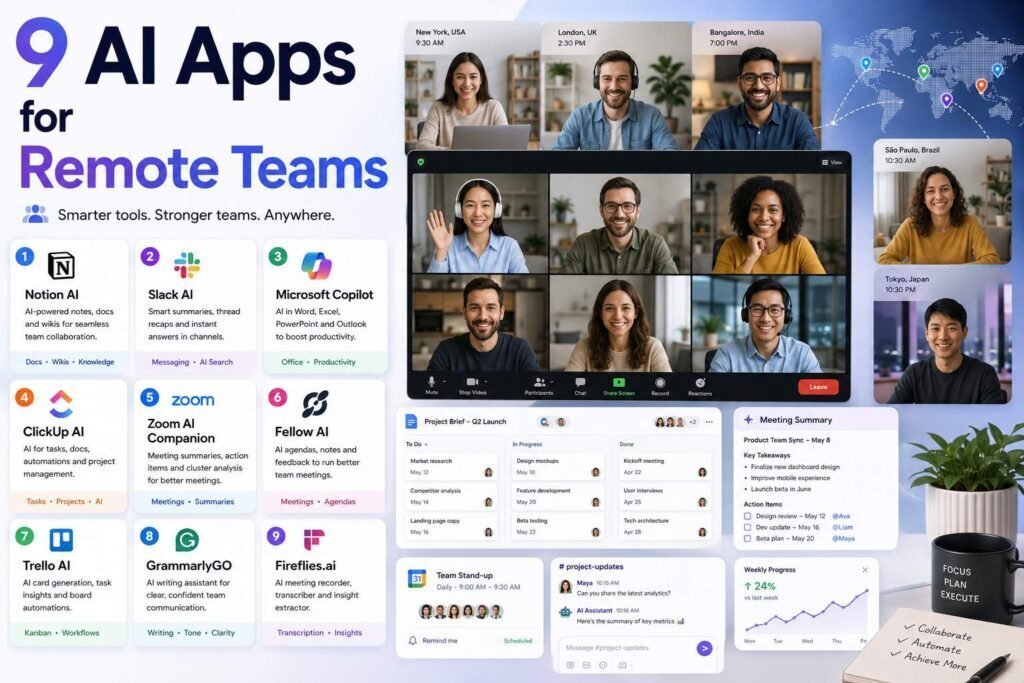
Remote teams lose time in three places: meetings nobody remembers, status updates nobody reads, and calendars nobody controls. The AI apps below attack exactly those three problems. We grouped them by job so you can build a stack instead of a subscription pile.
Quick answer: The highest-impact starter stack for most remote teams is an AI meeting notetaker (Fireflies or your video platform’s built-in AI), an AI-enabled workspace (Notion or ClickUp), and an AI calendar (Reclaim). Add Loom for async video and a general assistant (Claude or ChatGPT) per knowledge worker.
Key Takeaways
- Meeting AI is the fastest win: automatic notes and action items pay off in week one.
- Check what you already pay for: Zoom, Teams, and Google Meet all ship AI summaries on paid tiers.
- Workspace AI (Notion, ClickUp) reduces status meetings by answering “what happened” questions from project data.
- Guard against tool sprawl: every app must replace a meeting, a document, or another app.
The Three Time-Sinks Remote Teams Fight
Remote work loses time in three predictable places, and the most useful AI tools map directly onto them. The first is meetings nobody remembers, where decisions and action items evaporate the moment the call ends; meeting AI fixes this by capturing notes and tasks automatically. The second is status updates nobody reads, where people spend hours writing and re-reading “what happened” reports; workspace AI and async video replace much of that by answering questions from your actual project data. The third is calendars nobody controls, where focus time disappears under meeting creep across time zones; AI scheduling defends it. Build your stack around these three problems rather than around brands, and every tool you add will be solving a cost you can actually feel.
The Stack at a Glance
| App | Job | Starting price (verify) | Free tier |
|---|---|---|---|
| Fireflies | Meeting transcription + action items | Free; paid about $10-18/user/month | Yes |
| Notion (with AI) | Docs, wiki, projects + Q&A over your workspace | About $10-20/user/month | Yes |
| ClickUp (with AI) | Project management + AI summaries | Free; paid from about $7/user/month + AI add-on | Yes |
| Reclaim | AI calendar defense and scheduling | Free; paid from about $8-10/user/month | Yes |
| Loom (with AI) | Async video with auto titles/summaries | Free; paid from about $15/user/month | Yes |
| Slack AI | Channel and thread summaries | Add-on to paid Slack | No |
| Claude / ChatGPT | Per-person thinking and drafting | About $20/user/month | Yes |
| Grammarly | Team-wide writing quality | Free; paid from about $12/user/month | Yes |
| Zapier | Cross-app automation | Free; paid from about $20/month | Yes |
Meetings: Fireflies (or What You Already Own)
Fireflies joins your calls, transcribes them, extracts action items, and makes every meeting searchable. Before subscribing, check your video platform: Zoom AI Companion, Google Meet’s Gemini notes, and Teams Copilot all cover the basics on paid tiers you may already have. Choose Fireflies when you need cross-platform coverage, CRM syncing, or a searchable meeting archive. Free tier available; paid plans roughly $10-18/user/month (verify).
Etiquette matters: always disclose recording bots to external participants, and set retention policies before rolling out company-wide.
Workspace: Notion or ClickUp
Notion with AI answers questions across your wiki and projects (“what did we decide about pricing?”), drafts documents in context, and summarizes long pages. ClickUp leans harder into project management, with AI standup summaries and task generation from docs. Pick Notion if your team is documentation-centric, ClickUp if it is task-centric; running both duplicates effort. Verify current AI pricing on both, as bundling changes often.
Calendar: Reclaim
Reclaim auto-schedules focus blocks, defends them against meeting creep, finds team meeting slots across time zones, and reschedules lower-priority items when conflicts appear. For remote teams spread across time zones, it quietly removes a whole category of Slack negotiation. Free for basics; paid from about $8-10/user/month (verify). Alternatives: Motion (more aggressive task-scheduling), Clockwise.
Async Video: Loom
A five-minute Loom replaces a thirty-minute meeting more often than teams expect. AI features add automatic titles, summaries, and chapters, so recordings stay skimmable. Free tier; Business with AI around $15/user/month (verify).
Chat: Slack AI
Slack’s AI add-on summarizes channels and threads and answers questions from history, which is genuinely useful for catching up after time off. It is an add-on on paid plans; evaluate against simply pasting threads into your general assistant.
Per-Person: Claude or ChatGPT, plus Grammarly
Give every knowledge worker one general assistant seat (about $20/user/month) for drafting, analysis, and research, with a clear data policy about what may be pasted in. Grammarly remains the lowest-friction way to lift baseline writing quality across a team, from about $12/user/month for business plans (verify).
Glue: Zapier
Connect the stack: meeting action items to task manager, form submissions to Slack, CRM updates to digests. See our full automation tools guide.
Turning Meeting Notes Into Action
Meeting AI only pays off if the notes it produces actually drive work, so close the loop. The highest-value pattern is to pipe the action items a notetaker extracts straight into your task manager, so decisions become tracked tasks with owners rather than text nobody revisits. An automation tool like Zapier can do this handoff for you, moving action items from the transcript into the project tool the moment a call ends. Beyond tasks, a searchable meeting archive answers the “what did we decide about that?” questions that otherwise trigger a follow-up meeting. The tool captures the meeting; your workflow has to route what it captures into the places where the team actually works, and that small bit of plumbing is what turns automatic notes into fewer dropped balls.
Building an Async-First Culture
The biggest productivity gains for remote teams come less from any single app and more from shifting work async, and AI makes that shift easier. A five-minute recorded video with an auto-generated summary and chapters often replaces a thirty-minute meeting, letting people engage on their own schedule across time zones. Workspace AI answers status questions from project data instead of requiring a live standup. The tools remove the friction that used to make async harder than “just meeting,” clear summaries, searchable records, and quick catch-ups after time off. Teams that lean into this deliberately, defaulting to a recording or a written update before booking a call, reclaim the most time, because they attack the root cause rather than just documenting the meetings they still hold.
Data, Privacy, and Recording Etiquette
Because these tools listen to meetings, read your workspace, and process company communication, how they handle data is a first-class concern, not an afterthought. For meeting AI, disclose recording bots to all participants, which is polite and, in some jurisdictions, legally required, keep them out of sensitive calls such as legal, HR, and M&A discussions, and set retention limits before rolling out. For any tool that touches company data, use business tiers with model training disabled, and write a short policy stating what data may go into which tool. General assistants deserve the same care: give every seat a clear rule about what may be pasted in. None of this is onerous, and settling it up front prevents the awkward, avoidable incidents that derail otherwise good tool adoption.
Avoiding Tool Sprawl
The failure mode for remote teams is not too little tooling; it is too much. Every additional app is another subscription, another login, another place information hides, and another thing to keep secure. The discipline that keeps a stack healthy is simple: each tool must replace a meeting, a document, or another app, and if it does not clearly do one of those, it does not earn a place. Before adding anything, check whether a tool you already pay for covers the job, since Zoom, Teams, Google Meet, and your workspace increasingly ship AI features on tiers you already have. A small, well-understood stack that everyone actually uses beats an impressive-looking pile of apps that fragments your team’s attention and data.
Rollout Advice
- Adopt one tool per month, not five at once.
- Write a one-page AI usage policy: what data is allowed where, and who reviews AI output before it ships.
- Measure something: meetings reduced, response times, cycle time. Cut tools that do not move a number within a quarter.
Common Mistakes to Avoid
- Rolling out five tools at once. Adopt one per month so the team actually learns each before the next arrives.
- Paying twice for meeting AI. Check whether Zoom, Teams, or Google Meet already covers notes on your current plan before buying a separate tool.
- Recording without disclosure. Tell all participants, keep bots out of sensitive calls, and set retention limits; some jurisdictions require consent.
- No data policy. Decide what may be pasted into general assistants and who reviews AI output before it ships.
- Not measuring anything. Track meetings reduced or cycle time, and cut any tool that does not move a number within a quarter.
FAQs
What is the single best AI app for a remote team to start with?
A meeting notetaker. It requires zero behavior change and produces immediate, visible value.
Are AI notetakers safe for confidential meetings?
Use business tiers, disable model training, set retention limits, and keep the bot out of sensitive calls (legal, HR, M&A). Disclosure to all participants is both polite and, in some jurisdictions, legally required.
Notion AI vs ClickUp AI: which is better?
Notion for knowledge-heavy teams, ClickUp for delivery-heavy teams. The AI features are converging; the underlying work style is the real decision.
Should we give every employee an AI assistant seat?
For knowledge workers, usually yes; a single general-assistant seat per person, around $20 a month, pays for itself in drafting, analysis, and research time, provided you pair it with a clear policy on what data may be pasted in. For roles that rarely do that kind of work, it is fine to hold off. Match seats to who will actually use one, not to headcount for its own sake.
What is the fastest win for a team just starting with AI?
A meeting notetaker. It requires no behavior change, works from day one, and produces immediate, visible value in the form of notes and action items everyone can see. Starting there builds confidence and goodwill, which makes adopting the next tool, a workspace assistant or an AI calendar, far easier than trying to roll out everything at once.
How much should a remote team budget per person?
A capable stack, meeting AI, one workspace, an AI calendar, async video, and a general assistant, runs roughly $40 to $70 per person per month, and it buys back hours weekly when adopted deliberately. Before assuming that figure, check what your video and workspace platforms already include, since a meaningful share of these features may already be bundled into tiers you pay for.
Do these tools actually reduce meetings?
Yes, in two ways. Meeting AI removes the follow-up meetings that exist only to recap what was decided, and async video plus workspace AI let people answer “what happened” from recordings and project data instead of gathering live. The effect is real but depends on the team building the habit; the tools enable fewer meetings, and the culture has to take the opportunity.
What is the safest way to use AI notetakers?
Use business tiers with model training disabled, set retention limits, disclose the bot to everyone on the call, and keep it out of confidential meetings like legal, HR, and deal discussions. Those few settings, agreed before rollout, let you capture the benefit, searchable notes and automatic action items, without creating a privacy or compliance problem.
How do we stop the team from drowning in tools?
Apply one rule: every tool must replace a meeting, a document, or another app, and anything that does not is removed. Adopt slowly, one tool a month, check for overlap with what you already own, and measure the effect. A small stack everyone uses beats a large one that fragments attention and spreads your data across too many places.
Our Verdict
The winning remote-team stack is small: meeting AI, one AI workspace, an AI calendar, async video, and a general assistant per person. Roughly $40-70 per person per month buys back hours weekly, but only if you roll tools out deliberately and measure the effect.
Related Articles
- Best Chrome Extensions for Productivity
- Best Automation Tools for Small Businesses
- Best AI Tools for Marketing Teams
Sources: official pricing pages, checked early 2026. Per-seat AI pricing and bundling change frequently; verify before purchasing team licenses.