
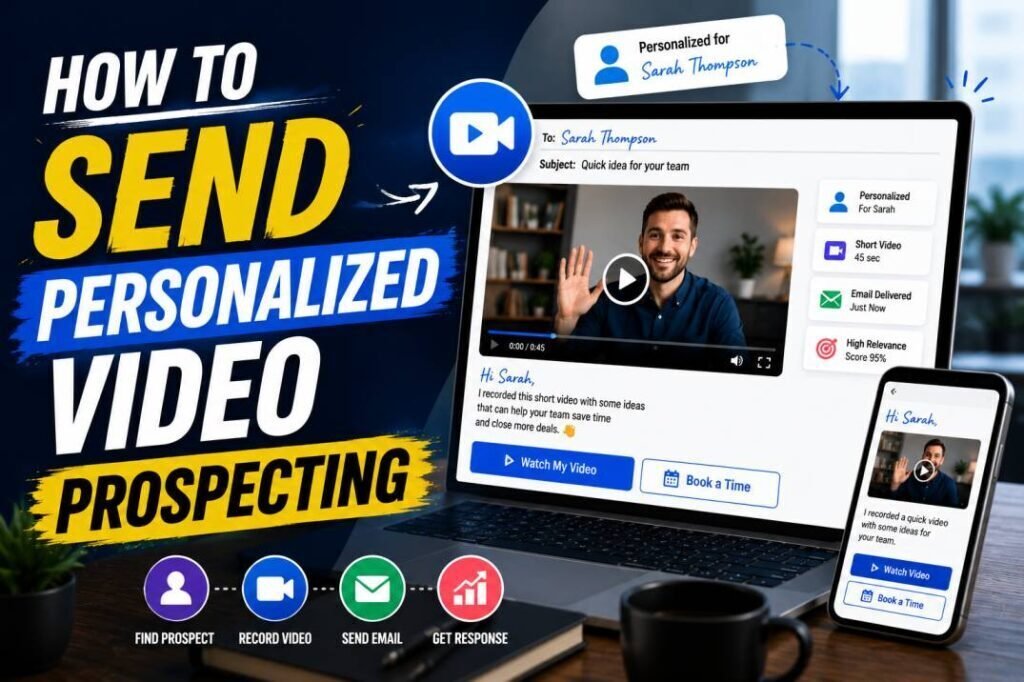
Cold prospecting is brutal because most messages look the same and get ignored. Personalized video prospecting flips that. When a prospect sees a video made just for them, with their name on the thumbnail and a message about their world, they pay attention. Dubb is built to make this fast and trackable. This guide walks through a complete personalized video prospecting workflow, from research to booked meeting.
Quick answer: To prospect with Dubb, research the account, record a short personalized video that leads with the prospect, add a thumbnail showing their name or company, send it by email or LinkedIn, and track who watches so you can follow up with the most engaged. Use templates and tiers to do this at scale without losing the personal feel.
Key Takeaways
- Personalized video prospecting stands out because it proves real effort and builds trust fast.
- Lead with the prospect in the first five seconds, and keep the video under a minute.
- A personalized thumbnail is what earns the click, so make it specific.
- Track engagement in Dubb and follow up fast with the prospects who watch.
- Use tiers and templates to scale without turning videos generic.
Why Video Prospecting Works
Video prospecting works for three reasons: it proves effort, builds trust quickly, and stands out in a text-heavy inbox. A prospect can tell a template from a message made for them, and a video is unmistakably personal. That head start on trust is exactly what cold outreach usually lacks. For the strategy behind it, see our video prospecting beginner’s guide. Dubb’s role is to make recording, personalizing, sending, and tracking fast enough to do every day.
Step 1: Research the Prospect
Personalization starts before you record. Spend a couple of minutes finding one genuine, specific detail: a recent company announcement, a role change, a post they wrote, or a shared connection. You do not need a dossier, just one real reason this message is for them. That single detail, dropped into your opening, is what separates a personalized video from a generic one with a name pasted on.
Step 2: Record a Short, Personal Video
Open Dubb and record a brief video, usually 30 to 60 seconds. Structure it simply: open with the prospect and your specific detail, connect it to a problem they likely feel, offer one relevant idea, and end with one small ask. Lead with them, never with yourself. For setup, delivery, and a reusable script, see our guide on how to record a sales video that gets responses. Record one or two takes; authentic beats polished.
Step 3: Personalize the Thumbnail
The thumbnail earns the click before the prospect ever plays the video. In Dubb, use a frame that shows your face with a personal cue, such as holding a whiteboard with the prospect’s name or company. This proves at a glance that the video was made for them. A personalized thumbnail is one of the highest-impact things you can do in prospecting, so do not skip it. Verify the current thumbnail options in your account.
Step 4: Send Through the Right Channel
Send your video where the prospect is most reachable. Through Dubb’s Gmail or Outlook integration, your email shows a clickable thumbnail that links to a hosted landing page. You can also send by SMS or share the link in a LinkedIn message, which works well for social selling. Pair the video with a short, personal subject line, since that drives the open. Our subject line guide shows how.
Step 5: Track and Prioritize
After sending, Dubb shows you who watched and how far they got. This is your follow-up roadmap. A prospect who watched your whole video, or came back for a second look, is signaling interest and deserves a fast, direct follow-up. Our guide to tracking engagement in Dubb explains how to read and act on these signals. Prioritize your time by engagement, not by list order.
Step 6: Follow Up Effectively
Most replies come from follow-up, not the first touch. Build video into a short sequence rather than a one-time send. A common pattern is a text intro, then a personalized video on the second touch, then a value-adding text, then a brief closing message. Video at the high-stakes moments, text in between, keeps the cadence fresh. Our follow-up video guide covers this in depth.
Scaling Video Prospecting
Recording a unique video for every prospect does not scale, and it does not need to. Use a tiered approach: fully custom videos for your top accounts, a personalized opening and thumbnail with a reusable body for warm segments, and one strong role or industry video for broad outreach. Dubb’s templates and campaign features help you send at volume while keeping the entry point personal. Our personalized video at scale playbook lays out the full system. Verify current template and campaign capabilities on your plan.
Example Prospecting Script
Adapt this to your voice and situation.
“Hi [Name], I saw [specific detail about them or their company]. Teams in that spot often run into [relevant problem], and I have a simple way to help with [outcome]. I put together a quick idea for [their company]. If it is useful, just reply here and I will send a couple of times. Either way, great work on [genuine detail].”
Notice that four of five sentences are about the prospect. That ratio is what keeps a prospecting video from feeling like a pitch.
Common Mistakes to Avoid
- Leading with yourself. Open with the prospect or lose them in five seconds.
- Faking personalization. A name on a generic video does not fool anyone.
- Going too long. Keep prospecting videos under a minute.
- Skipping the thumbnail. It is what earns the click.
- Not following up. Most meetings come from the follow-up, not the first video.
Build a Multi-Touch Prospecting Sequence
A single video rarely lands every prospect, so build video into a short, multi-touch sequence. Mixing formats keeps your outreach from feeling repetitive and gives prospects several natural chances to respond.
| Touch | Format | Goal |
|---|---|---|
| 1 | Short text email or LinkedIn note | Introduce a relevant reason to talk |
| 2 | Personalized video | Stand out and build trust |
| 3 | Value-add text (a resource, no ask) | Give before you ask |
| 4 | Short screen recording or second video | Show something specific |
| 5 | Brief closing message | Prompt a decision and close the loop |
Placing the first video on the second touch works well, because the prospect has already seen your name once. Use Dubb’s engagement data between touches to adjust: someone who watched your first video but did not reply is worth a more direct second video, while someone who never opened it may need a different subject line or channel.
Video Prospecting on LinkedIn
Email is not the only place video prospecting works. Sharing a Dubb video link in a LinkedIn message stands out just as much as it does in an inbox, and it fits the more casual, relationship-driven tone of the platform. Keep LinkedIn videos even shorter, reference something specific from the prospect’s profile or activity, and make the ask light. Because LinkedIn is where many buyers are most active, adding it as a second channel alongside email often lifts your overall response rate. The same principles apply: lead with them, keep it short, personalize the opening, and track engagement.
Measure and Improve Your Prospecting
Treat video prospecting as something you refine, not a one-time effort. Track the numbers that matter: how many prospects watch your videos, how far they get, and how many reply or book. Compare video touches against your text-only baseline to see the lift. If watch rates are low, work on your thumbnail and subject line. If people watch but do not reply, sharpen your message and ask. Test one change at a time, give it a fair sample, and keep what works. Our video sales metrics guide explains how to read each signal.
Getting Started This Week
You do not need a big program to begin. Pick your top five target accounts, research one genuine detail for each, and record a short personalized video using the script above. Add a personal thumbnail, send each through email or LinkedIn, and watch the engagement data. Follow up quickly with anyone who watches. Within a week you will have real results to learn from, and you can expand your video prospecting from there with confidence.
Frequently Asked Questions
How long should a prospecting video be?
Aim for 30 to 60 seconds. Long enough to be relevant, short enough to respect a busy prospect’s time. Only go longer when walking through something visual they asked about.
Can I send prospecting videos on LinkedIn?
Yes. Sharing a Dubb video link in a LinkedIn message works well for social selling and stands out just as it does in email. Keep it even shorter given the casual context.
How do I prospect with video at scale?
Use a tiered approach with templates: custom videos for top accounts, personalized openings with reusable bodies for warm leads, and one strong video for broad outreach. Verify Dubb’s current template and campaign features on your plan.
How do I know which prospects to follow up with?
Use Dubb’s engagement tracking. Prospects who watched fully or returned are your hottest signals, so follow up with them first and fast.
Personalize Without Spending All Day
The most common objection to video prospecting is time, and the fear that recording a unique video for everyone is impossible. It is, and you do not need to. The trick is to personalize only what the prospect notices first: the thumbnail and the opening line. Reference one real detail in your opening, use a thumbnail with their name or company, and let a reusable body carry the rest of the message. To the prospect, the video feels made for them, because the part they see first genuinely is.
This lets you tier your effort sensibly. Record fully custom videos for your highest-value accounts, where a single deal justifies the time. Use a personalized opening with a reusable body for warm segments. Use one strong role or industry video for broad outreach. Our personalized video at scale playbook lays out the full system, and it is what turns video prospecting from a nice idea into a daily habit you can actually sustain.
Handling Replies and Objections
A good prospecting video often gets a short reply like “interesting” or “tell me more.” How you respond decides whether that spark becomes a meeting. Reply fast, while your video is fresh in their mind, because interest fades quickly. Answer whatever they asked, then propose a clear next step in the same message rather than leaving the ball in their court. Offering two or three specific times can feel more personal than a bare booking link early in a relationship. And if a video started the conversation, another quick, warm video can keep the momentum going. The goal of prospecting is to start a genuine dialogue, so once a prospect replies, your job shifts from earning attention to being helpful, quickly.
Conclusion
Personalized video prospecting with Dubb follows a clear path: research one real detail, record a short video that leads with the prospect, personalize the thumbnail, send it through the right channel, track who watches, and follow up fast with the most engaged. Use tiers and templates to scale without losing the personal touch. Pick your top five target accounts and send each a personalized prospecting video this week, then follow up quickly with anyone who watches. Do that consistently, and video prospecting will become the part of your outreach that reliably fills your calendar. The reps who commit to it, even just a handful of videos a day, tend to build a steadier pipeline than those still sending the same templated messages everyone ignores. Start small, stay consistent, and let your own results show you how much video can change your prospecting.
Ready to stand out in the inbox? Start free with Dubb and send your first personalized prospecting video today.