
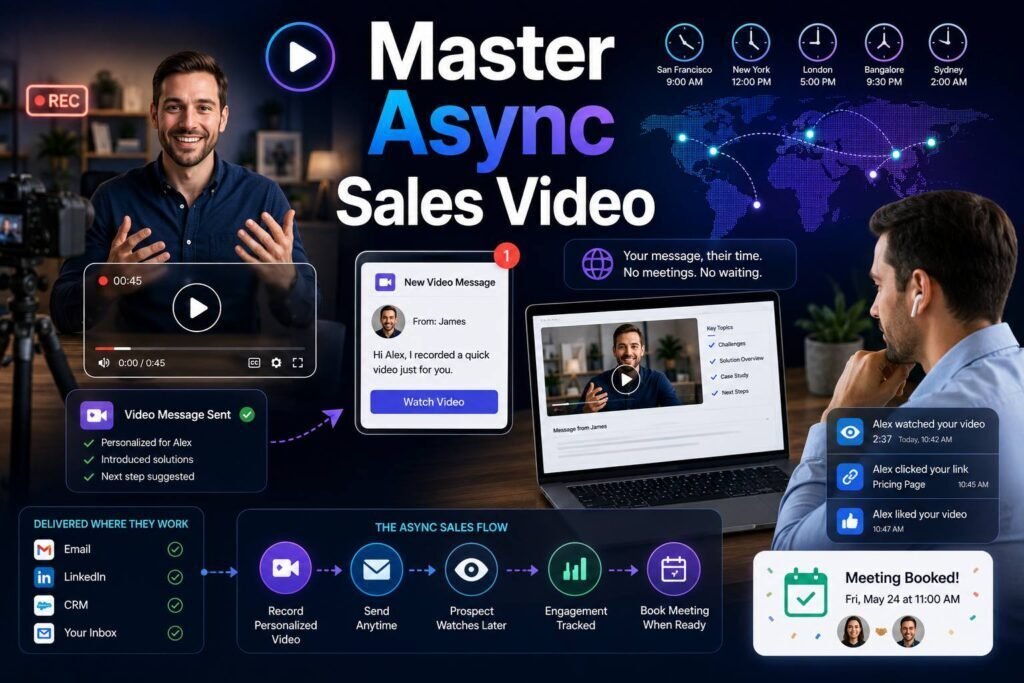
Sales does not have to happen live. Some of the most effective selling now happens on the prospect’s schedule, through short recorded videos they watch when it suits them. This is called asynchronous video, or async video, and it solves a real problem: buyers are busy, calendars are full, and not every message deserves a meeting. This guide explains when async video beats a live call, when it does not, and how to use it well.
Quick answer: Async video means recording a short message a prospect can watch anytime, instead of meeting live. Use it to prospect, follow up, walk through proposals, and answer questions without scheduling a call. Use live conversations for discovery, negotiation, and anything that needs real-time back and forth. The best sales teams blend both.
Key Takeaways
- Async video is a recorded message the prospect watches on their own time, not a live meeting.
- It removes the scheduling friction that stalls deals and respects the buyer’s calendar.
- Use async for outreach, follow-ups, proposal walkthroughs, and quick answers.
- Use live calls for discovery, negotiation, and complex, back-and-forth conversations.
- Keep async videos short, clear, and built around one next step.
What Is Async Video?
Asynchronous video is any video message sent for later viewing rather than watched together in real time. You record it once, send a link, and the prospect presses play when they have a moment. There is no calendar invite, no time zone math, and no waiting for a slot to open next week.
In sales, async video usually takes one of three forms: a talking-head message where you speak to the camera, a screen recording where you walk through something visual, or a hybrid where your face sits in the corner while you share your screen. Each fits a different job, and all three let you deliver a personal message without booking time on anyone’s calendar.
Async Video Versus Live Calls
Neither format is better in every situation. They solve different problems, and knowing which to reach for is the whole skill.
| Factor | Async video | Live call |
|---|---|---|
| Scheduling | None needed | Requires a booked slot |
| Speed to send | Immediate | Waits for availability |
| Personal feel | High | Highest |
| Real-time back and forth | No | Yes |
| Buyer effort | Low (watch anytime) | Higher (commit a time) |
| Best for | Outreach, follow-up, walkthroughs | Discovery, negotiation |
The trap is defaulting to a meeting for everything. Many touches that get scheduled as calls could be a two-minute async video, which saves both sides time and keeps the deal moving.
Why Async Video Works for Sales
Async video hits a sweet spot between the cold efficiency of text and the warm friction of a live call.
It removes scheduling friction. The hardest part of many deals is simply getting time on the calendar. Async video sidesteps that. You deliver the message now, and the prospect engages when they are ready, so momentum does not die waiting for a slot.
It respects the buyer’s time. Modern buyers want to move at their own pace and do their own research. A short video they can watch at 9 p.m. fits how people actually buy today, far better than pressuring them into another meeting.
It keeps the human connection. Text is efficient but cold. Async video brings back tone, expression, and personality, the things that build trust, without requiring both people to be free at the same time.
It scales. One rep can send dozens of thoughtful async videos in the time it would take to hold three live calls. That leverage is why async video has become a core sales motion, not a novelty.
When to Use Async Video
Reach for async video when the message is mostly one direction and does not need live discussion.
- Prospecting. Break into cold accounts with a personal touch that stands out. See our video prospecting guide.
- Follow-ups. Recap a call, revive a stalled deal, or nudge a quiet prospect. Our follow-up video guide covers this in detail.
- Proposal walkthroughs. Guide a buyer through a proposal so questions do not stall the deal.
- Answering questions. A 90-second video often explains something clearer than a long email and warmer than a text reply.
- Onboarding and handoffs. Welcome a new customer or introduce a colleague without another meeting.
When to Use a Live Call Instead
Async video is not a replacement for real conversation. Choose live when you need to listen and respond in the moment.
- Discovery. Understanding a prospect’s needs requires questions, follow-ups, and listening. That is a live conversation.
- Negotiation. Pricing and terms move fast and need real-time give and take.
- Complex or sensitive topics. When emotions or stakes are high, live builds trust that a recording cannot.
- Closing. The final steps of a deal usually deserve a real conversation.
A simple test: if you need to hear the other person’s answer before you know what to say next, meet live. If you are delivering a clear message and inviting a response later, send async.
How to Structure an Async Sales Video
An async video has to carry itself, because you are not there to read the room. A clear structure keeps it on track.
Open with the viewer
Lead with the prospect and a reason the video is for them. The first few seconds decide whether they keep watching, so never open with a long introduction about yourself.
Deliver one clear idea
Async video is not the place to cover everything. Pick the single most relevant point and make it well. If you have three things to say, send three short videos, not one long one.
End with one next step
Because there is no live moment to agree on what happens next, your closing ask carries extra weight. Make it specific and easy, such as “reply with a yes and I will send times.” Learn to craft strong closes in our guide to video CTAs.
For setup, delivery, and a reusable script, see how to record a sales video that gets responses.
Async Video Across the Sales Cycle
Async video is useful from first touch to renewal. Here is where it fits.
| Stage | Async video use |
|---|---|
| Prospecting | Personalized intro to earn a reply |
| Discovery follow-up | Recap and confirm next steps |
| Proposal | Walk through the offer and pricing |
| Negotiation | Clarify a point between live calls |
| Onboarding | Welcome and guide new customers |
| Renewal | Show results and open the next conversation |
Using Async Video at Team Scale
Async video gets more powerful when a whole team adopts it. The keys to scaling it well are consistency and reuse. Build a small library of proven videos, such as a strong company intro, a common objection response, and a standard proposal walkthrough, so reps do not start from scratch every time. Personalize the opening and the thumbnail for each prospect, and let the reusable middle do the heavy lifting.
Tracking matters at scale too. Knowing who watched, how far they got, and who rewatched tells a team where to focus. A video platform such as Dubb handles hosting, templates, personalized pages, and analytics in one place, which is what makes team-wide async video practical rather than chaotic. Compare options in our best video messaging software guide.
How to Measure Async Video
Because async video is measurable in ways a live call is not, use that data. Watch rate tells you if your length and hook are right. Reply and meeting rates tell you if the message and ask land. Rewatches and shares often signal a prospect is bringing others into the decision. Our video sales metrics guide explains how to read each signal.
Common Mistakes to Avoid
- Using async when you should meet. Discovery and negotiation need live conversation.
- Making it too long. Async attention is short. One idea per video.
- Skipping the ask. With no live moment to agree on next steps, the closing ask is everything.
- Being too polished. Over-produced async video loses the personal feel that makes it work.
- Ignoring the data. Async video gives you engagement signals; use them to follow up smartly.
Async Video Etiquette
Because async video feels personal, a few courtesies keep it welcome rather than intrusive.
- Respect the reply. If a prospect answers in text, do not insist on video back. Meet them where they are.
- Do not overuse it. A video on every single touch loses its impact. Reserve it for moments that matter.
- Keep it professional but relaxed. Async video works because it is human, so a natural tone beats a stiff, scripted one. Just keep the setting and background appropriate for business.
- Make it easy to skip ahead. For longer walkthroughs, tell viewers where to jump, such as “skip to the pricing at the one-minute mark,” so they never feel trapped.
Treat async video as a considerate way to save the prospect a meeting, not a clever way to demand their attention, and it will consistently land well.
How to Get Started This Week
You do not need a rollout plan to begin. Start small and build the habit.
- Pick one use case. Choose a single spot in your process, such as post-demo recaps, and use async video there for a week.
- Record five videos. Keep each under 90 seconds and focus on one clear ask.
- Track what happens. Note reply and meeting rates compared to your usual text touches.
- Expand what works. Once one use case pays off, add async video to the next stage.
Within a few weeks you will know exactly where async video earns its place in your process, backed by your own results rather than a general promise. From there, the habit tends to spread on its own, because once a rep sees a stalled deal move after a two-minute video, they rarely go back to waiting on the calendar.
Frequently Asked Questions
Is async video the same as a webinar recording?
No. A webinar recording is a one-to-many broadcast. Async sales video is a short, often personalized message sent to a specific person or a small group to move a conversation forward.
Will async video replace sales calls?
No. It replaces the calls that never needed to be calls, and frees your time for the conversations that genuinely benefit from being live.
How long should an async sales video be?
Usually 30 to 90 seconds. Go up to a few minutes only for a proposal or demo walkthrough the prospect expects.
Do prospects actually watch async videos?
When the message is relevant and short, yes. A personalized thumbnail and a specific subject line drive the click, and a strong hook keeps them watching.
Async Video and the Modern Buyer
The rise of async video is not a fad. It matches how people prefer to buy now. Buyers do their own research, engage on their own schedule, and resist being pushed into meetings before they are ready. Async video fits that behavior perfectly, giving prospects a personal, human touch they can absorb at 7 a.m. or 10 p.m., whenever suits them.
It also reflects how teams work today, spread across time zones and juggling packed calendars. A recorded message crosses those gaps without a scheduling puzzle. Sellers who lean into async video are not just adopting a tactic; they are aligning with the way modern B2B buying actually happens. That alignment, more than any single feature, is why async video keeps earning a bigger place in the sales toolkit.
Conclusion
Async video gives sales teams the trust of face-to-face contact without the friction of scheduling. Use it to prospect, follow up, walk through proposals, and answer questions on the buyer’s schedule, and save live calls for discovery, negotiation, and closing. Blending the two is how modern teams move deals faster while respecting everyone’s time. Pick one deal this week and replace a meeting that did not need to happen with a two-minute async video. Track the reply, note how it felt to skip the scheduling dance, and let that first result decide where async video earns a permanent place in your process.
Want async video with tracking, templates, and personalized pages built in? Start free with Dubb and send your first async sales video today.