
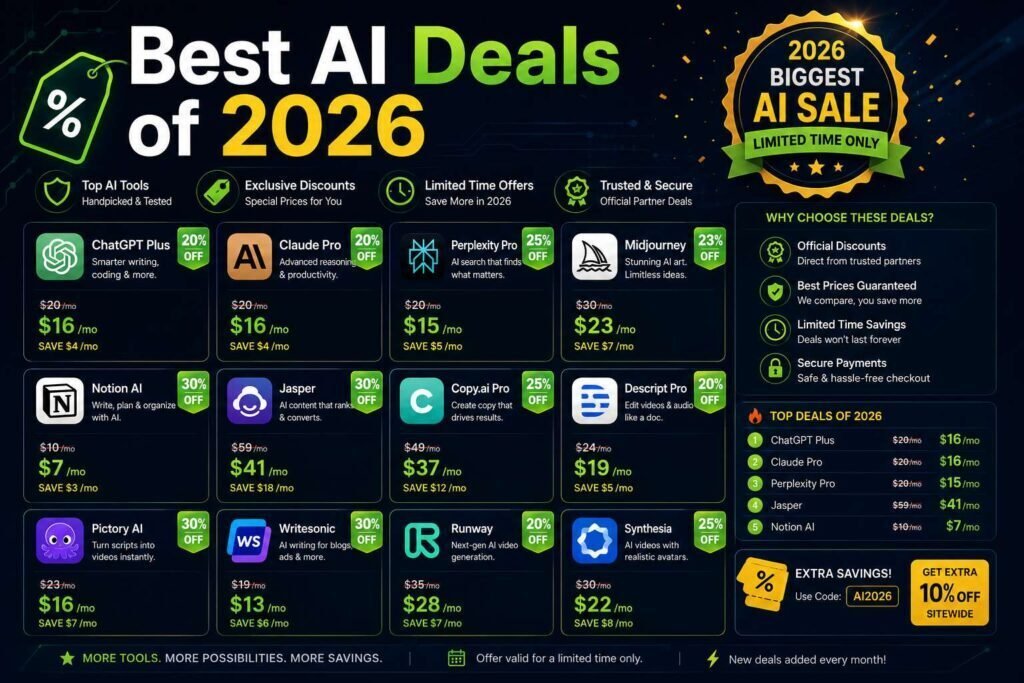
The best “deal” on AI software is usually not a flashy coupon. It is annual billing, a generous free tier, or a discount program you already qualify for. This guide shows where the real savings are, lists current verified offers, and flags the tricks that make a bad deal look good.
Key Takeaways
- Annual billing typically saves 15-25% versus monthly on most AI tools. Verify before committing.
- Free tiers are the biggest “discount” of all; see our 100 free AI tools guide.
- Students, nonprofits, and startups often qualify for special pricing that beats any coupon.
- Watch for intro-rate traps: a low first-year price that jumps at renewal is not a deal.
How AI Pricing Actually Works
Saving on AI tools starts with understanding how they charge, because the models differ from classic SaaS. Consumer assistants run freemium: capable free tiers with usage limits, an individual paid tier around $20 a month, and premium tiers above for heavy use, with annual billing as the standing discount. Business tiers charge per seat and buy admin controls and data protections more than raw capability. API and developer pricing meters by usage, where the real lever is choosing the right model size for each task rather than any coupon. And credit-based tools, common in image and video generation, sell bundles where the effective price depends entirely on how many credits you actually consume. Once you see which model a tool uses, the best saving strategy for it becomes obvious, and the sections below map them.
Where the Real Savings Are
| Type of saving | Typical benefit | Best for |
|---|---|---|
| Annual billing | 15-25% off monthly (verify) | Tools you will keep 12+ months |
| Free tier | 100% off, with limits | Light or starting users |
| Student pricing | Discounts or free premium | Verified students (.edu) |
| Nonprofit programs | Discounts or donated licenses | Registered nonprofits |
| Startup programs | Credits and discounts | Early-stage companies |
| Bundles | AI included in a suite you own | Existing software subscribers |
| Lifetime deals | One payment, no subscription | Newer tools you will use long-term (see below) |
Current Verified Deals
[EDITOR: Replace with verified, current offers only. For each: tool, the offer, who qualifies, an official link, and the date verified. Remove expired offers. Do not fabricate discounts.]
The Free-First Strategy
For AI specifically, the free tier is not a demo; it is often the product. The leading assistants run genuinely capable free tiers, one of them generous enough to serve as a daily driver, and free image, transcription, and automation tools cover entire jobs, as our 100 free AI tools directory shows. The strategy that follows: run free until a specific limit costs you real time weekly, and let that limit, not marketing, trigger the upgrade. When you do pay, pay for one assistant you use daily rather than three you sample, and revisit the choice quarterly because capabilities shift fast. Most individuals and small teams discover their honest AI budget is one or two subscriptions, with everything else covered by free tiers that keep improving underneath them.
Stacking Savings Legitimately
The discounts in the table combine more often than people expect. A verified student can take a free premium offer where available and annual billing on whatever they still pay for. A registered nonprofit can hold program pricing on its email platform, bundled AI inside its existing suite, and free-tier assistants for staff, spending almost nothing on AI while using it daily. A startup in an accelerator can layer cloud credits under startup program discounts and pay annual rates only on the survivors. The order of operations is always the same: qualify for programs first, exhaust bundles and free tiers second, then apply annual billing to the small set of tools that remain. Coupons, if any exist, come last and matter least.
Discount Programs Worth Checking First
- Students: many assistants and design tools offer discounts or free premium with a .edu email; see our student tools guide.
- Nonprofits: email platforms and CRMs run nonprofit programs; see our nonprofit email guide.
- Startups: major cloud and SaaS providers offer credits through accelerator and startup programs.
- Existing subscribers: check whether AI is already bundled into your CRM, office suite, or design tool before buying anything new.
When Paying Full Price Is the Right Call
A savings guide should also say when not to optimize. If an AI tool measurably earns its cost, an assistant that saves a billable hour a week pays for months of itself, then the twenty dollars is among the best money in your budget, and hunting a discount on it wastes more attention than it saves. The professionals who get the most from AI typically pay full freight for one or two core tools without hesitation, precisely because they were ruthless about everything else: free tiers for secondary needs, cancelled overlap, no speculative subscriptions. Frugality and investment are the same discipline pointed at different tools. Optimize hard on the periphery, pay happily for the core, and re-evaluate quarterly which is which as the field moves.
Right-Sizing AI Spend for a Team
For a business, the AI bill is mostly a seats-times-tools problem, and both factors respond to management. On seats: not every role needs a paid assistant, so give paid seats to the people whose daily work is drafting, analysis, or code, and let lighter users run free tiers until their usage argues otherwise. On tools: standardize on one assistant so knowledge and prompts transfer, and require any specialized AI purchase to name the job the standard tool cannot do. Then watch the bundling wave: office suites, CRMs, design platforms, and meeting tools keep folding AI into existing tiers, which regularly converts a paid point tool into a free feature you already own. A team that reviews AI spend quarterly against actual usage typically funds its genuine needs entirely from cancelled redundancy.
Two Real-World Scenarios
A freelance designer wants AI for drafting proposals and generating concept art. The free tier of a general assistant covers the writing; their existing Canva Pro subscription just added generation credits, covering the art. Total new spend: zero, with an annual assistant plan as the eventual upgrade if limits bite. A ten-person agency audits its AI line and finds four overlapping writing tools, two unused image subscriptions, and an assistant feature already bundled in its CRM tier. Consolidating to one assistant per producer on annual billing, plus the bundled features, cuts the AI bill roughly in half while capability goes up, because everyone is finally on the same tool. In both cases the savings came from structure, not coupons.
Deal Traps to Avoid
- Renewal cliffs: a cheap first term that triples at renewal (common in hosting; see our hosting guide). Compare the long-term cost.
- Annual lock-in on tools you are still testing: pay monthly until you are sure.
- “Deals” on tools you will not use: the cheapest subscription is the one you cancel.
- Fake-urgency countdowns: most “ending soon” banners reset. Buy on value, not pressure.
Common Mistakes to Avoid
- Hunting coupons before checking programs. Student, nonprofit, and startup pricing beats any public code; qualify first.
- Paying for AI you already own. Suites keep bundling assistants and AI features into tiers you subscribe to; check before buying separately.
- Annual lock-in on a fast-moving category. Commit yearly only to tools that survived real monthly use; AI shifts too quickly for speculative lock-ins.
- Falling for countdown timers. Most reset; a deal that cannot survive a day of thought is not a deal.
- Counting the discount, not the total. Judge year-two cost and actual usage, not the percentage on the banner.
FAQs
Are there coupon codes for AI tools like ChatGPT or Claude?
Major assistants rarely use public coupons; their “discount” is annual billing and free tiers. Be skeptical of sites promising codes for them.
Is annual billing worth it?
Yes for tools you are committed to, usually 15-25% off. No for tools you are still evaluating; the savings do not offset paying for a year you might not use. A useful rule for AI specifically: sixty days of real monthly use before any annual commitment, because the category changes fast enough that certainty takes longer than it does elsewhere.
Do free tiers of AI tools stay free?
Limits shift, but the pattern has held: leading assistants keep genuinely usable free tiers because they compete for users, while smaller tools trim free plans more often. Build on free tiers with open eyes, keep an alternative in mind for anything you depend on, and treat a tightened limit as a signal to re-run the value comparison rather than upgrade reflexively.
Where should I check for legitimate offers first?
The vendor’s own pricing page, its education, nonprofit, or startup program pages, and the suites you already subscribe to, in that order. Third-party deal roundups, including ours, are pointers to verify against the official page, never the source of truth, because offers change faster than any list.
How do you keep this list current?
We re-verify offers on a schedule and remove expired ones. The date next to each deal shows when it was last checked.
Do AI tools discount during major sale seasons?
Some do, particularly annual plans on smaller tools and credit bundles on creative platforms, while the major assistants mostly hold steady pricing year-round. Sale seasons are a reasonable time to lock annual billing on a tool you already committed to, and a poor reason to adopt something new.
Is it cheaper to use AI through an API than a subscription?
For light or irregular use, often yes: metered API pricing on a right-sized model can undercut a monthly seat. For daily conversational use, the flat subscription usually wins and is simpler. Developers and automation-heavy teams should price both paths against their real volume before defaulting to seats.
How do I avoid paying for overlapping AI subscriptions?
Pick one general assistant per person and make every additional AI tool justify a job the assistant cannot do. Audit quarterly, because assistants absorb neighboring features constantly, and the specialized tool you needed last year may now be a button inside something you already pay for.
Are lifetime deals a good way to save on AI tools?
Occasionally, with open eyes. AI runs on ongoing compute costs, which makes unlimited-forever promises fragile, so favor lifetime offers with clearly sustainable limits and vendors with a track record. Our lifetime deals guide covers how to judge them honestly.
Are education discounts only for university students?
Program terms vary: some vendors verify any student status, others require a university email, and several extend discounts to educators and institutions. If you are studying, teaching, or run training programs, check each tool’s education page directly, because eligibility is broader than most people assume and the savings recur every billing cycle.
What is the single best money-saving habit for AI tools?
The quarterly overlap audit. AI capabilities consolidate so quickly that a tool essential three months ago may now be a bundled feature inside something you already pay for. Fifteen minutes a quarter comparing your AI subscriptions against what your existing stack just shipped reliably finds money nothing else will.
Do referral programs offer real savings on AI tools?
Sometimes: several tools grant credits or free months for referrals, which is genuine value if you would recommend the tool anyway. Treat referral perks as a bonus on tools you already trust, never a reason to adopt one, and disclose the relationship when recommending tools professionally.
Bottom Line
Before hunting coupons, switch committed tools to annual billing, exhaust free tiers, and check whether you qualify for student, nonprofit, or startup pricing. Those beat almost every “deal,” and they never expire in a countdown timer. For ongoing offers, bookmark this page and our lifetime deals guide.
Related Articles
Sources: official pricing and discount-program pages, checked early 2026. Offers change constantly; verify before purchasing.