
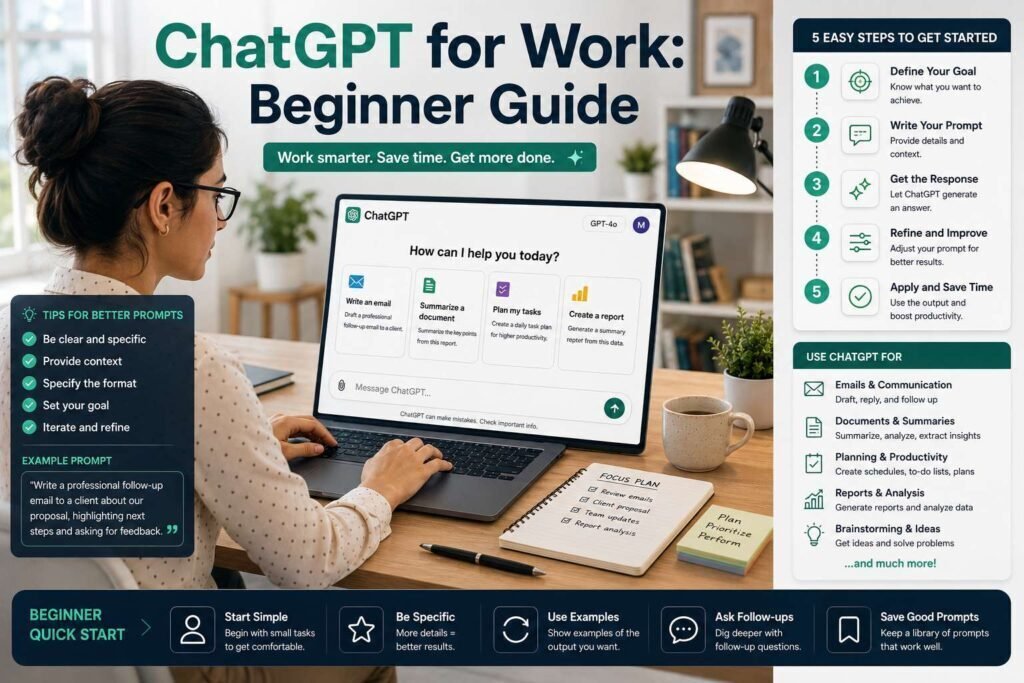
ChatGPT can save you hours a week at work once you get past typing questions into it like a search box. This beginner’s guide walks through setup, the prompting habits that separate useful output from generic filler, and the real work tasks it handles best, plus how to keep company data safe.
Key Takeaways
- The free tier is enough to learn on; upgrade only when limits get in your way.
- Context is everything: tell ChatGPT your role, audience, goal, and format.
- Best work uses: drafting, summarizing, rewriting, brainstorming, and explaining.
- Never paste confidential data into a personal account; use business tiers with training off.
What to Expect in Your First Week
Setting expectations correctly prevents the two most common early exits: quitting because output was generic, and over-trusting because it was fluent. In your first sessions, ChatGPT will feel simultaneously impressive and slightly off, drafts arrive instantly but sound like nobody in particular, answers are confident but occasionally wrong. Both impressions are accurate, and both are addressable. The generic feel disappears as you learn to supply context and iterate, which is what Steps 2 and 4 teach. The confident-but-wrong problem never disappears; it is managed by the verification habits in Step 5. Plan on a week of using it for low-stakes tasks, emails, summaries, brainstorming, before relying on it for anything visible, and expect your results to improve more from your prompting than from any model change. The tool rewards skill, and the skill takes days, not months.
Step 1: Set Up Your Account
Go to the official ChatGPT site, create an account, and start on the free tier. Explore the interface: the message box, the model selector, and settings. For work, check Settings > Data Controls and understand whether your chats may be used to improve models (and how to turn that off). If your employer provides a business or enterprise tier, use that instead; it disables training on your data by default. Pricing for paid tiers is about $20/month for individuals (verify current pricing).
Set Up Custom Instructions Once
The single highest-leverage settings change for work use is Custom Instructions, which let you tell ChatGPT once who you are and how you like answers, instead of repeating it in every chat. Fill in your role and industry, your typical audience, and your output preferences, concise, plain language, no filler phrases, and every future conversation starts warm. Add the standing constraints that matter to you: “ask clarifying questions when my request is ambiguous,” “flag any factual claims I should verify,” “match the tone of samples I provide.” Five minutes here upgrades every subsequent prompt, and it is the difference between an assistant that knows it is drafting for a project manager at a construction firm and one guessing at context from scratch each time. Revisit the instructions quarterly as your role and preferences evolve.
Step 2: Learn the Prompt Formula
A weak prompt (“write about marketing”) gives weak output. A strong prompt gives ChatGPT four things:
- Role: “Act as an experienced [job].”
- Task: what you want, specifically.
- Context: audience, goal, constraints, and any source material.
- Format: length, structure, tone.
Grab more ready-made prompts from the AdNxt ChatGPT Prompt Library.
Step 3: Use It for Real Work Tasks
| Task | How ChatGPT helps |
|---|---|
| Email and messages | Draft, rewrite, adjust tone, summarize threads |
| Documents | Summarize, outline, turn notes into structured drafts |
| Brainstorming | Generate options, pressure-test ideas, find blind spots |
| Learning | Explain concepts at your level, quiz you |
| Data and spreadsheets | Write formulas, explain errors, structure data |
When to Upgrade, and What Paid Buys You
Stay on the free tier until it visibly costs you something, then upgrade for a reason you can name. The three legitimate triggers: you keep hitting message or usage limits mid-task, you need the most capable models for harder analysis and drafting, or you want more file and image capacity for document-heavy work. The individual paid tier, about $20 a month (verify current pricing), removes those frictions; business tiers matter for a different reason, data controls and admin management, and are the right call the moment work data is involved regardless of usage volume. What paid does not buy is skill: a fluent free-tier user outperforms a careless subscriber every time. Upgrade when a named limit bites weekly, and treat the subscription like any other tool cost, reviewed occasionally against the time it saves.
Step 4: Iterate Instead of Accepting the First Draft
The first response is a starting point. Push it: “make it shorter,” “more specific,” “less formal,” “add an example.” The second and third versions are where the quality is. Treat ChatGPT like a fast junior colleague you give feedback to, not a vending machine.
Step 5: Keep Data Safe and Verify Output
- Do not paste confidential client data, passwords, or trade secrets into a personal account.
- Use business tiers with training disabled for anything sensitive, per your company policy.
- Verify facts: ChatGPT can state wrong information confidently. Check anything that matters.
- Own the output: you are responsible for what you send, not the AI.
Building the Daily Habit
The gap between people who benefit from ChatGPT and people who tried it once is mostly habit architecture. Keep it open in a pinned tab, because a tool you must go find loses to one that is already there. Route one recurring task through it completely, your weekly status update, meeting-notes cleanup, first drafts of routine emails, so a concrete benefit repeats on schedule and cements the habit. Save the prompts that work in a personal file, building your own library the way our prompt collection models, and refine them as you learn. And set a boundary as deliberate as the habit: the tasks where you will not use it, final legal language, sensitive personnel matters, anything you cannot verify, so the habit grows inside safe lines. Within a month, the pinned tab becomes as automatic as the calendar.
Working With Files, Images, and Voice
Beyond typed chat, three input modes multiply what beginners can do. Uploading a file, a report, a spreadsheet, a slide deck, lets you ask questions against the actual document instead of describing it, which transforms summarizing and analysis; paid tiers extend the size and volume limits. Pasting or uploading an image or screenshot works for reading an error message, extracting a table from a photo, or getting a chart explained. Voice turns commutes and walks into dictation and thinking sessions, with the conversation waiting in text when you sit down. Each mode has the same rule as text: the clearer your ask and the more context you attach, the better the result, and anything confidential stays out of personal accounts regardless of how it enters, typed, photographed, or spoken.
A Worked Example: From Notes to Finished Email
Here is the full workflow on a real task, turning messy meeting notes into a status email. First prompt: “Act as a project coordinator. Below are my raw notes from today’s vendor meeting. Draft a 120-word status email to my manager: what was decided, what is blocked, what happens next. Professional but warm. Notes: [pasted notes].” The draft arrives structured but slightly stiff, so you iterate: “Less formal, and lead with the decision about the timeline.” Second draft is close; one more push, “add a one-line ask for her approval on the budget change”, and it is done. Total time: under three minutes for an email that would have taken fifteen, and every fact in it came from your notes, not the model’s imagination. That pattern, real material in, specific ask, two quick iterations, verified result out, is the entire method, and it transfers to documents, summaries, and plans unchanged.
Common Mistakes to Avoid
- Vague prompts with no context. “Write about marketing” produces the same filler for everyone; role, task, context, and format fix it.
- Accepting the first draft. The quality lives in the second and third iterations; push every output at least once.
- Trusting facts and figures without checking. Fluency is not accuracy; verify anything that matters before it leaves your hands.
- Pasting sensitive data into a personal account. Confidential material belongs in business tiers with training off, per policy.
- Using it as a search engine. For current facts, make it search and cite, or use a search tool; its memory has limits and a cutoff.
- Stopping after one bad session. Early generic results reflect prompting, not potential; the skill curve is days, not months.
FAQs
Is the free version of ChatGPT enough for work?
For most beginners, yes. Upgrade when message limits or the best models start blocking your workflow.
Which is better for work, ChatGPT or Claude?
Both are excellent. ChatGPT is the versatile all-rounder; Claude is often preferred for writing quality. See our ChatGPT vs Claude comparison.
Can my employer see my ChatGPT chats?
On a personal account, no, but company policy may still govern use. On an enterprise account, administrators may have controls. Follow your organization’s AI policy.
What if my company has no AI policy yet?
Apply the conservative defaults until one exists: no confidential or client data in personal accounts, verify everything before it ships, and be transparent with your manager about how you are using the tool. If you are in a position to, suggest a one-page policy; it protects everyone and usually unlocks more confident use, not less.
Does ChatGPT work in languages other than English?
Yes, well, across major languages, for drafting, translating, and explaining. The same formula applies: state the language, audience, and tone you want. For nuanced or high-stakes translation, have a fluent human review, exactly as you would verify any other output that matters.
How long does it take to get good at this?
Days for the basics, weeks for fluency. The prompt formula produces visibly better results immediately, and after a couple of weeks of daily use, iterating and supplying context becomes automatic. Fluency is worth pursuing: the difference in output quality between a skilled and unskilled prompter using the same model is larger than the difference between model tiers.
Should I tell colleagues or clients I used ChatGPT?
Follow your organization’s policy and any client agreements first. Beyond formal rules, a practical standard: disclose where authorship matters or where policy requires it, and always ensure the work is verified and genuinely yours in judgment, because you are accountable for it either way. Most routine drafting assistance sits comfortably in the same category as spell-check.
What tasks should a beginner not use ChatGPT for?
Anything you cannot verify (unfamiliar statistics, legal or medical specifics), anything confidential on a personal account, and any final decision that is really yours to make. It is also weak on very recent events unless it searches, and on precise arithmetic at scale, where a spreadsheet is the right tool. Everything else routine is fair game with review.
Is ChatGPT the only tool I should learn?
It is a fine first tool, and the skills transfer completely: the same role-task-context-format formula works in Claude, Gemini, and Copilot. Once comfortable, spend an afternoon with one alternative on your real tasks, per our comparison, and keep whichever fits your work best. The habit matters more than the brand.
Can I use ChatGPT for meetings and calls?
Indirectly and usefully: paste your rough notes afterward for cleanup into minutes and action items, or prepare beforehand by having it draft an agenda and likely questions. Live transcription is a different tool category, and recording anyone requires disclosure, so keep ChatGPT in the before-and-after role where it excels.
Bottom Line
Start on the free tier, learn the role-task-context-format prompt formula, use ChatGPT for drafting and summarizing, iterate on every output, and keep sensitive data out of personal accounts. Do that and it becomes one of the most useful tools in your workday. Next, learn to automate repetitive tasks with AI.
Related Articles
Sources: official ChatGPT documentation and pricing, checked early 2026. Verify current pricing and data-control settings.