
AI agents can now do a surprising amount of marketing work. They can research a product’s audience, write ad angles, generate static images and short videos, upload ads to an ad account, and pause the ones that underperform. For a small business with no designer, no video editor, and no full-time media buyer, that sounds like a dream.
It can also go wrong quickly. An agent with too much access can burn through a budget, upload off-brand or misleading ads, or trigger platform restrictions by hammering an API. This guide explains how to set up AI agents for marketing in a way that saves real time while keeping a person in control. It is written for business owners and marketing leads in the US and Canada who are curious about agents but do not want to gamble their ad accounts.
Key takeaways
- An agent is only as good as the data, access, and tools you give it. Plan those three before you plan any prompts.
- Give agents the narrowest access that does the job. Read data from your own reports or warehouse, and limit what they can change in ad accounts.
- Treat creative production and campaign management as separate jobs, each with its own review step.
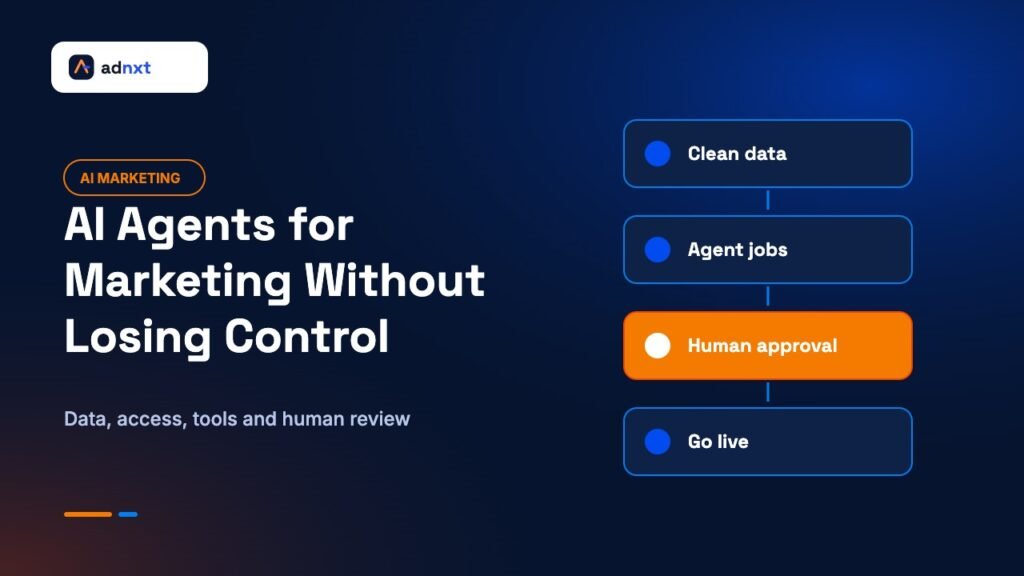
- Keep a human approval gate before anything goes live, and a score-based check before a person even looks.
- Start with one narrow workflow, measure it against your current process, then expand.
The video behind this guide
This guide builds on a long conversation between Greg Isenberg and marketer Cody Schneider in the video “AI Agents are too good at marketing now,” published on Greg Isenberg’s YouTube channel on November 9, 2026. Schneider walks through how he sets up AI coding agents to act as what he calls a “marketing engineer”: giving them business data, ad platform access, and media tools, then using them to produce static ads, AI avatar videos, and creator briefs. He also stresses keeping human taste in the loop and treating agents as jobs to be done rather than all-knowing employees. AdNxt is not affiliated with either creator. We have turned the main ideas into a practical setup guide with the guardrails we think a business needs. Watch the original on YouTube.
What “AI agent” means here
A chatbot answers when you ask. An agent takes a goal, breaks it into steps, and uses tools to carry them out. In marketing, that might mean: read last month’s ad results, find the three best angles, write five new versions of each, generate images in your brand style, and save them for review.
The model itself is only one piece. What makes an agent useful is the environment around it:
- Data it can read, such as ad performance, sales, customer reviews, and your brand guide.
- Access to the systems it needs to act on, such as an ad account or a file folder.
- Tools it can call, such as image generators, video tools, or a transcription service.
- Instructions that describe the job, often saved as reusable “skill” files or templates.
Most disappointing agent projects fail because one of these is missing or messy, not because the AI model is weak.
Step 1: Get your data in order
An agent that cannot see your results will guess. An agent that sees clean, current data can make sensible choices. Before you automate anything, collect the data an agent would need into one reliable place.
Useful data for a marketing agent includes:
- Ad performance by campaign, ad set, and ad, including spend, clicks, and conversions.
- Sales or qualified leads from your CRM or store, so the agent can judge real results, not just clicks.
- Your brand guide: colors, fonts, tone of voice, words you do and do not use.
- Customer language from reviews, support tickets, and sales calls.
- Your current offers, prices, and policies.
Many businesses use a simple data warehouse or even a well-organized spreadsheet that updates daily from their ad platforms and CRM. The point is that the agent reads from one trusted source rather than pulling live data from every platform on its own.
Step 2: Give the narrowest access that works
This is where agent projects get risky. If you hand an agent full control of your ad account, it can create campaigns, raise budgets, and change targeting. That is rarely what you want.
Separate reading from writing
One approach Schneider describes in the video is to let the agent read performance data only from the warehouse, and use the ad platform’s API only for specific actions, such as uploading creative or pausing an ad. This has two benefits. First, it limits what the agent can do inside the ad account. Second, it reduces the number of calls the agent makes to the platform’s API.
Respect API limits and terms
Ad platforms, including Meta and Google, publish terms and rate limits for their APIs. Agents can be careless with requests, sending far more than a human ever would, especially when they loop or retry. That can lead to errors, temporary blocks, or account reviews. Have your developer add rate limiting and clear rules about which API actions the agent may take.
Limit money-related actions
As a rule, do not let an agent raise budgets, create new campaigns, or change billing without a person approving each change. Pausing an underperforming ad is lower risk than spending more.
Use separate credentials
Create dedicated access for the agent, not your personal login. That way you can see what it did, limit its permissions, and turn it off without affecting your own access. Our guide on creating an AI use policy for a small business covers how to decide what tools and data AI can touch.
Step 3: Choose tools for each job
An agent needs tools to do creative work. Common ones include image generation models, video and avatar tools, transcription services, and lead or contact data providers. Many can be accessed through a single account that gives the agent several models to choose from.
When choosing tools, check:
- Whether the output can be used commercially under the tool’s terms.
- Whether the tool stores or trains on your uploads.
- How much each generation costs, since agents can create many versions quickly.
- Whether you can set a spending cap.
Step 4: Build workflows as jobs, not as one super-agent
A key idea in the video is to stop thinking of an agent as one all-knowing employee. Instead, look at what a skilled person actually does in a role, break it into jobs, and turn each job into a workflow with clear inputs and outputs.
For example, the work of a performance marketer could become separate jobs:
- Research angles. Read reviews, competitor ads in public ad libraries, and past results. Output a list of pain points, desired outcomes, and ad angles.
- Write ad copy. For each approved angle, write headlines and primary text in the brand’s voice.
- Make static images. Generate on-brand images for each approved headline using the brand guide.
- Make short video scripts. Turn the best angles into scripts for an avatar, a creator, or your own team.
- Review performance. Each morning, read yesterday’s results and suggest which ads to pause or scale.
Each job is easier to test and fix than one giant instruction. If image quality is poor, you fix the image job without touching the others.
Step 5: Put quality gates before anything goes live
AI-generated creative is fast, but not always right. Images can show the product wrong, text can contain errors, and claims can drift into promises you cannot back up. Two gates help.
Gate one: an automated check
Before a person sees anything, have a second AI step review the output against a checklist and score it. For example: Does the image match the brand colors? Is the product shown accurately? Is the text free of spelling mistakes? Does the copy avoid banned claims? Is the call to action clear? Only outputs that score well move on. Schneider describes a similar idea in the video: let a “creative director” step review a first pass and fix issues before a human spends time on it.
Gate two: a human approval
A person who knows the brand approves every ad before it goes live. This is where taste, judgment, and compliance live. The agent saves hours of production. The human spends minutes deciding. Our guide on human-in-the-loop automation explains where review is most important.
Step 6: Keep your ads honest
Agents are good at copying patterns that perform, including bad ones. Without guidance, they may write exaggerated claims, invent statistics, or generate testimonial-style videos that suggest real customers said things they did not.
Set clear rules in your instructions:
- Only use claims the business can prove. List approved claims in the brand guide.
- Never invent customer reviews, quotes, or results.
- If you use AI avatars or synthetic voices, do not present them as real customers. Follow platform and legal rules on disclosure.
- Avoid styles that imitate news reports or official notices.
Meta’s Advertising Standards set out what is and is not allowed in ads on its platforms. Ad platforms are also expanding rules about labeling AI-generated or altered content in some regions, so check the current requirements where you advertise. When in doubt, ask a person, not the agent.
Step 7: Use AI and humans together for video
AI avatar videos can now read scripts convincingly and add motion graphics automatically. They are useful for testing many angles quickly. But real people still bring trust that synthetic presenters often cannot.
A practical middle path discussed in the video: use agents to write scripts and briefs, then send the best ones to real creators through a creator platform, paying per video. The agent handles the coordination and editing, such as adding captions and graphics, while the human creator provides the face and voice. This keeps production fast without relying only on synthetic content.
A starter project for your first month
Do not try to automate everything at once. Pick one narrow workflow and compare it against how you work today.
Week 1: Prepare
- Write a one-page brand guide: colors, fonts, tone, approved claims, and banned words.
- Export three months of ad results and a sample of customer reviews into one folder or sheet.
- Decide who will approve AI output.
Week 2: Build one workflow
- Set up an agent to read the data and propose ten ad angles with reasons.
- Have it write copy and generate static images for the top five approved angles.
- Add an automated checklist review before human approval.
Week 3: Test
- Upload the approved ads yourself, or let the agent upload them to a paused ad set for you to switch on.
- Run them alongside your current ads with a modest budget.
Week 4: Measure
- Compare cost per lead or sale, and the hours spent, against your usual process.
- Note what the agent got wrong and update its instructions.
- Decide whether to expand to the next job, such as daily performance reviews.
How to tell whether agents are worth it
It is easy to be impressed by how much an agent produces. Volume is not the same as value. Before you expand any agent workflow, measure it against the way you worked before. Track these numbers for the same period and similar budgets:
- Hours saved. How much time did your team spend producing and launching ads before, and how much now, including review time?
- Cost per qualified lead or sale. Use results from your CRM or store, not only the ad platform’s numbers.
- Approval rate. What share of agent output passed human review? A low rate means the instructions or data need work.
- Error rate. How many approved ads later needed fixing because of wrong details, off-brand visuals, or policy issues?
- Tool costs. Add up what you spent on AI models, image and video generation, and any platforms the agent used.
A workflow is worth keeping if it saves meaningful time without raising your cost per result or your error rate. If it produces more ads but worse results, slow it down and improve the inputs before scaling.
It also helps to keep a simple log. For each batch, note what the agent was asked to do, what came out, what a person changed, and how the ads performed. Over a few weeks, patterns appear: maybe the agent writes strong headlines but weak images, or handles one audience well and another poorly. Those notes tell you exactly what to fix in the instructions, and they make it much easier to hand the workflow to someone else on your team.
Common mistakes to avoid
- Giving full account access on day one. Start read-only, then add specific actions one at a time.
- Skipping the data step. Agents working from screenshots and guesses make poor choices.
- Trusting every output. AI tools make confident mistakes. Our guide to verifying AI outputs lists practical checks.
- No cost limits. Image and video generation can add up fast. Set caps on every paid tool.
- Measuring only output volume. More ads is not the goal. Better results per hour and per dollar is.
- Losing your prompts. Save working instructions so the whole team can reuse them. See how to build an AI prompt library.
Frequently asked questions
Can AI agents run my Facebook or Google ads on their own?
They can handle many tasks, such as writing copy, making images, and suggesting which ads to pause. But letting an agent change budgets or launch campaigns without human approval is risky. Keep a person in control of spending and anything that goes live.
Will using an AI agent get my ad account banned?
Not by itself. Problems usually come from breaking platform rules, such as sending too many API requests, using misleading creative, or violating ad policies. Limit the agent’s access, add rate limits, and review every ad before launch.
What data does a marketing AI agent need?
Ad performance data, sales or lead results, your brand guide, customer language from reviews and support, and your current offers. Keep it in one trusted place that updates regularly.
Are AI avatar video ads allowed?
Platforms generally allow AI-generated creative, but you must follow their ad policies and any disclosure rules that apply where you advertise. Never present an AI avatar as a real customer giving a testimonial.
Do I need a developer to set up marketing agents?
Simple workflows, like drafting copy from exported data, can be set up without code. Connecting agents to ad platform APIs, data warehouses, and approval systems safely usually needs a developer.
Final thoughts
AI agents can take a lot of repetitive production work off a small team’s plate. The businesses that benefit most will not be the ones that hand over the keys. They will be the ones that feed agents good data, give them narrow and well-defined jobs, and keep a person deciding what goes in front of customers. Start small, measure honestly, and expand only when a workflow has earned your trust.
Related AdNxt guides
- Human-in-the-loop automation: where review is essential
- How to create an AI use policy for a small business
- How to build an AI prompt library your team will actually use